
How to Compare Developer Projects for One Client
By Dealora Published Updated Reviewed by Ali Darwish 9 min read
A broker's method for putting projects from several developers side by side: the criteria that matter, one place for projects, phases and files, and a clean shortlist for the client.

To compare developer projects for a client, write down the client's requirements first, then score each project on the same six criteria: location, phases and delivery, payment plan, unit types, developer track record and contract terms. Keep every project's files in one record, check the location on a map, and send the client a short, consistent shortlist.
To compare developer projects for a client, fix the client's requirements first, then judge every project against the same six criteria: location, phases and delivery, payment plan, unit types, developer track record and contract terms. The method only works if each project's details sit in one place, because a comparison built from forwarded chats and half-remembered brochures is a comparison of whoever sent the most recent file. A broker can run it for one client in Dealora instead of a spreadsheet.
Start from the client's requirements, not the developers' launches
A comparison without a brief turns into a list of everything that is currently on offer. Before you open any project, write down what this client needs: unit type, budget, preferred area, how soon they need to move or exchange, and whether they are buying to live in or to hold. The last point changes what counts as a good project, which is why it helps to tell an investor from an end user buyer before you shortlist anything.
In Dealora's CRM, these answers live on the client record as requirements such as unit type, budget and project, mostly filled from the ad form. You can click a requirement to see everyone else who wants the same thing, which is useful when one shortlist can serve several buyers. The salesperson's calls, WhatsApp messages, meetings and site visits sit on the same page, so the reason a project was dropped is not lost.
The six criteria to compare developer projects
Use the same criteria, in the same order, for every project. When one project has a missing answer, write "not confirmed" rather than skipping the line, because a gap is information the client should see.
Location
Compare the real position of each project, not the area name in the launch material. Distance to the roads the client uses, what else is already built nearby, and whether the project's boundary matches what the brochure implies all matter. Two projects in the same district can feel very different on the ground.
Phases and delivery
Ask which phase the client's unit belongs to and what delivery date is attached to that phase, not to the project as a whole. Delivery times and delays vary widely between developers, so let the developer's own record on earlier phases set your expectation, and check the delay penalties in the contract.
Payment plan
Down payments, installment lengths and interest terms vary by developer and project, so compare the plans as written, not as advertised. Read the whole schedule: a plan that looks flexible can hide balloon payments near the end, and the client should see them on day one, not at the third year.
Unit types
List what is actually available to this client: unit types, sizes and floor plans. A project that is right on location and price but has no unit in the client's size range should drop off the shortlist early, before you spend a meeting on it.
Developer track record
This is often the biggest factor in choosing an off-plan property in Egypt. Check the developer's completed projects, customer reviews and financial stability. Egypt's rules work differently from Dubai's escrow law, which sends off-plan buyers' payments into a project escrow account. Prime Minister's Decree No. 2184 of 2022 requires a separate bank account for each project or phase, through which its revenues and expenses pass, and a deposit in it before a phase is offered. Ask the developer about that account and its approvals, and still weigh the developer's financial strength and history. The developer's financial health also decides whether a project is completed at all.
Put these questions to the developer:
- Were your last three phases delivered on time?
- Which delivered community can we visit?
- Who manages the community after handover?
Beyond the answers, verify that the developer owns the land and holds the necessary permits, and visit its other projects to see whether the promised amenities were delivered.
Contract terms
An off-plan contract in Egypt should clearly state the delivery date, penalties for delays and the unit specifications. Put the three side by side for each project. If one developer's draft is vague on delay penalties and another's is specific, the client should hear that from you before they hear it from a lawyer.
A comparison grid you can reuse
One table per client, one row per criterion, one column per project. Fill it from the project record, not from memory. The third column shows where the answer lives in Dealora.
| Criterion | What to confirm | Where it sits in Dealora |
|---|---|---|
| Location | Position, approved boundary, what is within reach | Locations list and Projects Map |
| Phases and delivery | The client's phase and its delivery date | Phases on the project, with the optional delivery date |
| Payment plan | Down payment, installment length, any late balloon payments | The payment plan file on the project |
| Unit types | Types, sizes and floor plans actually available | Project types and floor plan files |
| Track record | Last three phases, a visitable community, who manages it after handover | Your own notes and site visits, plus the developer's contacts |
| Contract terms | Delivery date, delay penalties, unit specifications | The developer's contract files, for people with the contracts permission |
Keep each developer's projects, phases and files in one place
The usual reason comparisons go wrong is scattered data. The brochure is in one salesperson's phone, the payment plan came through a WhatsApp group last month, and nobody knows which master plan is current. Dealora's Developers and Projects module is built to be that one source: every developer you sell for, their projects and phases, the locations those projects sit in, and their files.
Each project carries a name, one or more types (Residential, Commercial, Administrative), a location, an optional logo and a cover picture. Project files such as the master plan, brochure, payment plan and floor plans can be PDFs or pictures up to 60 MB each. Phases carry an optional delivery date and logo, so the delivery question from your grid has a home.
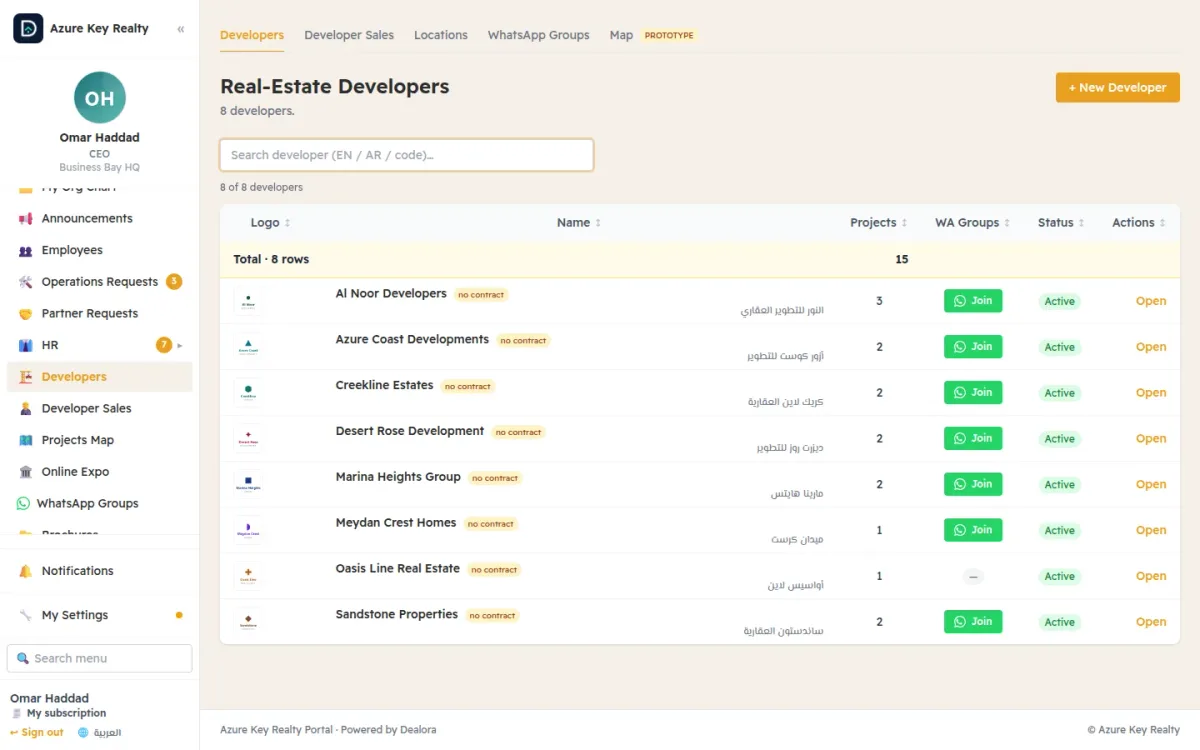
The Locations tab holds your own two-level list, a Region and its Areas, and projects pick their location from it. Every report and every comparison therefore uses the same spelling, and a project named two ways no longer splits your numbers. Contracts are filed with their signed date and commission percentage, and a new agreement is saved as a new version while the old one is kept, which helps when you need to know what applied to an earlier deal.
Check the location on the projects map
Location is the criterion clients challenge most, usually in the middle of a call. The Dealora Projects Map shows each project's approved boundary. Search by project or developer, press a name, and the map flies to it and opens a panel with the description, unit types, delivery dates and the first files, plus tabs for Files, Phases and Developer sales.
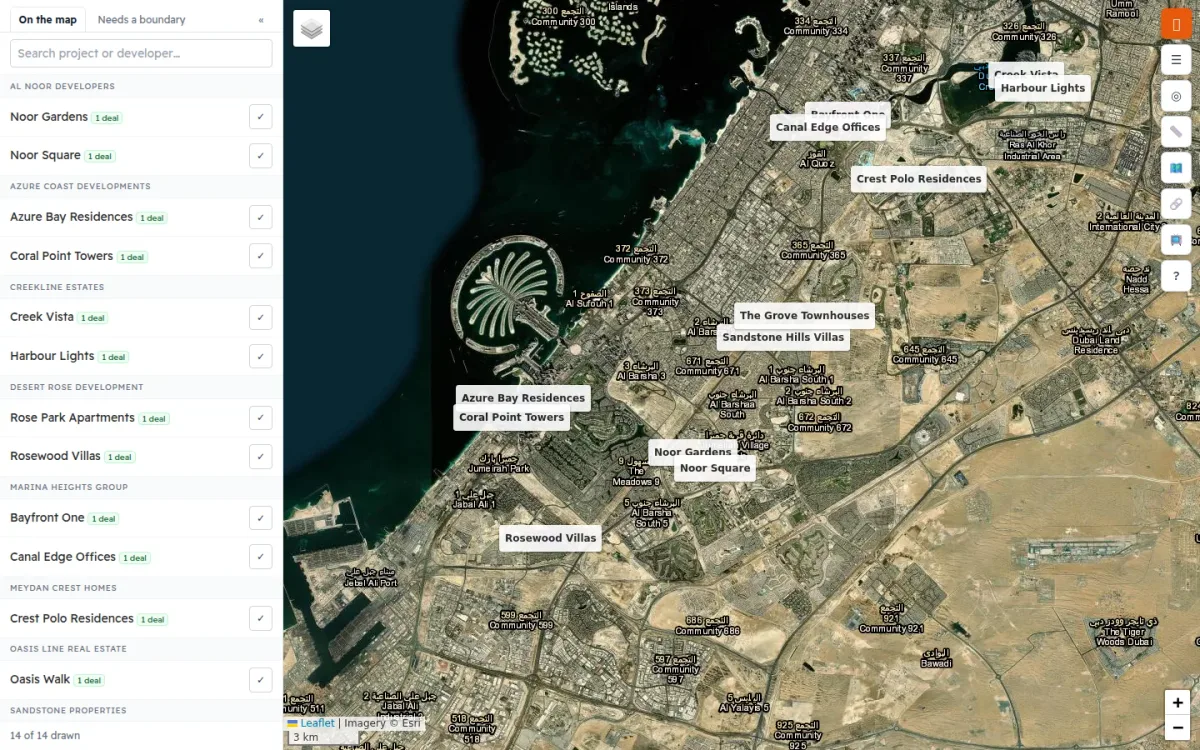
At the bottom of the panel are Directions, Street View and Nearby, which lists what else you have within 5 km. That last one is handy when a client is torn between two developers in one area: you see both outlines and everything around them in one view. A share button copies a link to exactly what you are looking at, including the open project.
Outlines are shown as solid to the sales team only after someone with the developers manage permission approves them. A drawn boundary waiting for review is not presented as fact, so what you show the client has been checked.
Reach the developer's sales team and the latest brochure
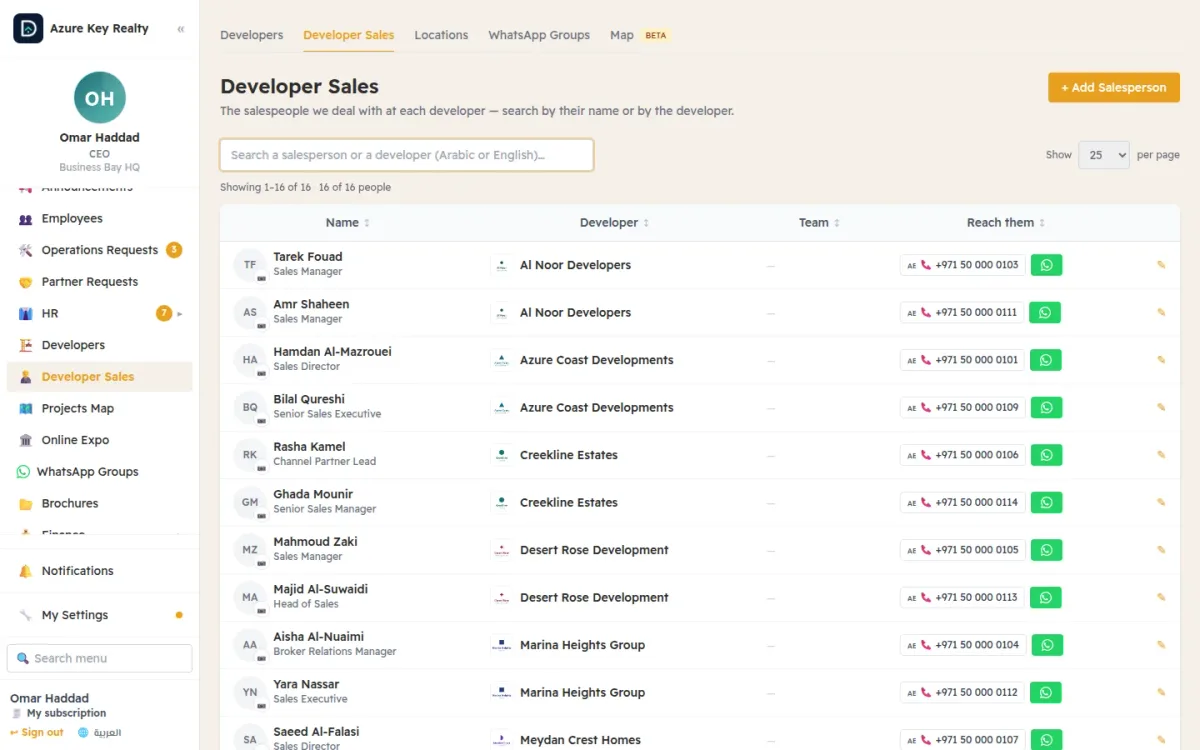
Some answers in your grid will not be in any file: whether a unit is still available, whether a delivery date has moved, what the payment plan looks like this month. The Developer Sales index keeps the salespeople at each developer in one shared, searchable list with titles, numbers, emails and who they report to. Search works in Arabic or English, by name, number, email or developer, and each number has a call button and, where marked, a WhatsApp button.
For the documents themselves, the Brochures library (on the Growth plan and above) keeps PDF brochures grouped by category. Managers publish each new version with a label such as the month, up to 100 MB, and salespeople download the latest one. The earlier version moves to the version history, so two salespeople are not quoting two different price sheets, and every download is recorded.
Send the client a clean shortlist
A shortlist of two to four projects is easier to decide on than ten. For each project, send the same short block: where it is, the phase and delivery date for the client's unit, the payment plan in one or two lines including any late balloon payments, the unit types on offer, and what you found on the developer's record. Same order, same length, so the client compares projects and not formatting.
Attach one key file per project rather than a folder. In the Projects Map panel, Send gives the client a link to that one file by WhatsApp, email or a copied link, and the link works for 14 days. Before turning your screen to a client, press Present mode: deals, the developer's people and everything internal are hidden, so the client sees only the project.
Keep your grid and your internal notes on the track record for yourself. The client gets the conclusion and the evidence behind it, such as a community you visited together, not your scoring sheet.
Mistakes that weaken a project comparison
- Comparing launch prices instead of full payment schedules. A lower down payment can come with a heavier end of the plan.
- Taking the project's delivery date as the unit's. The client's phase is what counts.
- Ranking on brochures alone. Visit delivered communities and check land ownership and permits.
- Retyping details into a sheet. Every retyped line is a chance for an old figure to survive in the shortlist.
- Letting the shortlist grow. Past four projects, the client stops comparing and starts postponing.
Set it up before the next client call
Pick the three developers you sell most and enter their projects, phases, locations and key files in Developers and Projects this week. Add their salespeople to the index, then run your next client through the six criteria. For what happens after the client picks, the off-plan sales process walkthrough covers the steps from reservation onward, and you can try the projects set-up (Developers and Projects, the Projects Map and the Developer Sales index) on the free trial that every new company starts with; the Brochures library comes with Growth and above.
Sources
Frequently asked
What should a broker compare between two developers' projects?
Compare location, phases and delivery dates, the payment plan, unit types, the developer's track record and the contract terms. Use the same six criteria for every project so the client sees a fair comparison. Track record usually matters most, because delivery and completion depend on the developer's finances and history.
How long does an off-plan project in Egypt take to deliver?
Delivery times vary widely by developer and project, and delays happen. Check what each developer actually delivered on its last phases, and the delay penalties in its contract, before promising a date to a client.
How do I check whether a developer is reliable?
Review its completed projects, customer reviews and financial stability. Ask whether its last three phases were delivered on time, which delivered community you can visit, and who manages the community after handover. Verify that it owns the land and holds the necessary permits, and visit its other projects.
What is the risk in a flexible payment plan?
Plans that look flexible can hide balloon payments near the end, so read the full payment schedule, not only the down payment and the monthly installment. Down payments and plan lengths vary by developer and project, so compare the written schedules side by side.
Is there escrow protection for off-plan payments in Egypt?
Not in the Dubai sense. Prime Minister's Decree No. 2184 of 2022 requires a separate bank account for each project or phase, through which its revenues and expenses pass, and a deposit before a phase is offered. Ask the developer about that account and its approvals, and vet the developer's financial strength and track record before comparing prices.
How can I send a client a clean shortlist of projects?
Pick two to four projects that match the client's requirements, then send the same set of details for each: location, delivery, payment plan, unit types and one key file. In Dealora's Projects Map you can send a single file by WhatsApp, email or a copied link, and the link works for 14 days.
Read next
- Off-Plan Launch Checklist: 10 Checks for Brokers Before Day One Ten checks a brokerage sales team completes before a developer opens sales, each with an owner and a due date,
- How to Send Project Details to a Client: A Same-Day Routine A fixed order for brokers: find the project on the map, pick the current files, send them from one place and r
- How to Test a CRM Free Trial: A 30-Day Plan for Brokerages A week-by-week 30-day plan for brokerage owners: import real leads, run the pipeline with real reps, check dev
- Selling Off-Plan Property in Dubai: Team Roles and Follow-Up Selling off-plan property in Dubai with several developer launches running at once needs clear roles, lead rul