
Off-Plan Launch Checklist: 10 Checks for Brokers Before Day One
By Dealora Published Reviewed by Ali Darwish 11 min read
Ten checks a brokerage sales team completes before a developer opens sales, each with an owner and a due date, and where a CRM, brochure library and projects map keep them in one place.

An off-plan launch checklist for a brokerage has ten checks: project facts and payment plan, licence status, brochures, a call-first client shortlist, lead routing, reply standards, WhatsApp templates, sender roles, a launch-day follow-up board and a week-one review. Each gets one owner and a due date counted back from launch day.
An off-plan launch checklist for a brokerage is a short list of checks, each with one owner and a due date, that the sales team completes before a developer opens sales. The ten below cover project facts, licence status, brochures, a call-first shortlist, lead routing, reply standards, WhatsApp templates, sender roles, a launch-day board and a week-one review. It is written from the broker's side: the developer runs the launch, and you run your own team's readiness. Dealora is a platform for brokerages in Egypt, Saudi Arabia and the UAE, and its modules cover some of these checks, such as project data, brochures and lead distribution.
The off-plan launch checklist at a glance
Count backward from launch day, called L. The dates are working defaults: when a developer gives short notice, keep the order and compress the gaps.
| # | Check | Owner | Due |
|---|---|---|---|
| 1 | Project facts and payment plan confirmed | Sales manager | L-10 |
| 2 | Developer licence and registration status on file | Sales manager, with whoever signs off advertising | L-10 |
| 3 | Brochures current and downloadable | Marketing manager | L-7 |
| 4 | Call-first shortlist of qualified clients | Team leaders | L-5 |
| 5 | Lead routing rules set | CRM admin | L-5 |
| 6 | Reply standards agreed and briefed | Sales manager | L-3 |
| 7 | WhatsApp templates submitted and approved | Marketing manager | Submit at L-7, approved by L-2 |
| 8 | Who sends what to whom written down | Sales manager | L-2 |
| 9 | Launch-day follow-up board built | CRM admin | L-1 |
| 10 | Review after the first week | Sales manager and owner | L+7 |
The sections below explain each check: what to confirm, what to avoid and where the answer should live so nobody asks for it in a group chat at midnight. For the steps that follow the launch, from reservation to contract, the off-plan sales process walkthrough picks up where this list ends.
Facts, licence and files: checks 1 to 3
1. Project facts and payment plan
Owner: sales manager. Due: L-10. Ask the developer's sales contact for one confirmed set: unit types, sizes, phases, delivery dates, the payment plan, the reservation steps and the commission terms your brokerage agreed. Get it in writing, and record the date you received it.
Keep the set in the project record, not in a forwarded chat. In the Developers & Projects module, each project holds its location, types, phases with delivery dates, and files such as the master plan, payment plan and floor plans. Each developer page also holds contracts as versions and a commission rate library, so finance later knows which terms applied to which deal. Add the location to the Projects Map too, so a salesperson can show a client the surrounding roads and what else sits within 5 km, and can press Present mode to hide anything internal before turning the screen.
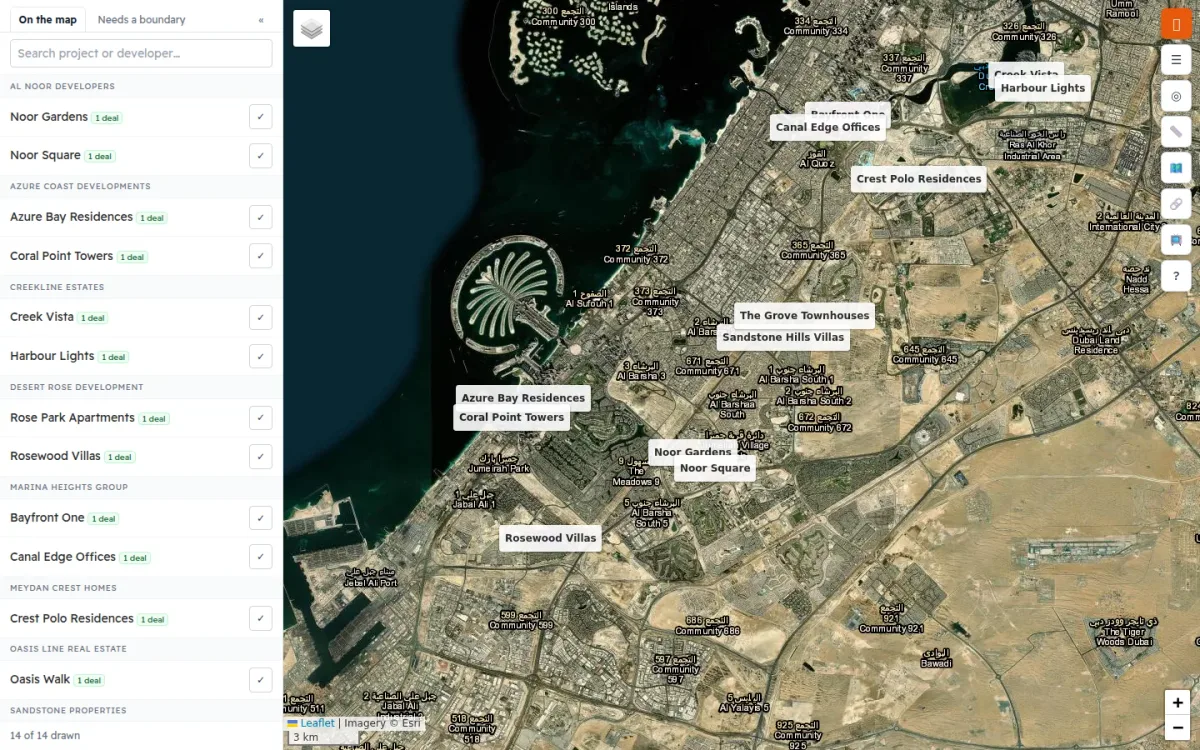
Both modules are on every Dealora plan, including the 3-month free trial on the Starter plan. Salespeople should be able to answer "which phase, what delivery date, what down payment structure" from this one record on launch day.
2. Licence and registration status
Owner: sales manager, with whoever signs off advertising. Due: L-10. Before any invitation goes out, ask the developer for the licence, registration or permit references that apply to the project, and store them next to the project files. The rules differ by country and change, so read the current text from the regulator rather than from memory.
- Saudi Arabia: under Article 3 of the Law of Selling and Leasing Off-Plan Real Estate Projects, a developer may not sell or lease off-plan projects unless registered in the Registry of Developers. Such projects may not be advertised in local or foreign media, and no exhibitions may be organised to promote them, unless the competent authority has licensed the project. A developer may apply for a marketing licence before the project itself is licensed, and the real estate regulator (REGA) decides on that application within 10 working days. Qualification through REGA's off-plan platform is mandatory before a developer can obtain a licence to sell or lease.
- Dubai: under Article 6 of Law No. (8) of 2007, a developer who wishes to sell units off-plan must ask the Dubai Land Department to open an escrow account, and under Article 9 the account is opened in the project's name and used only for building that project. So each project has its own account. Under Article 3 of Law No. (13) of 2008, an off-plan sale not entered in the Interim Property Register is void.
For projects in other markets, ask the developer in writing for the equivalent approvals. If a reference is missing on L-10, the launch date is not yours to promise to clients.
3. Brochures
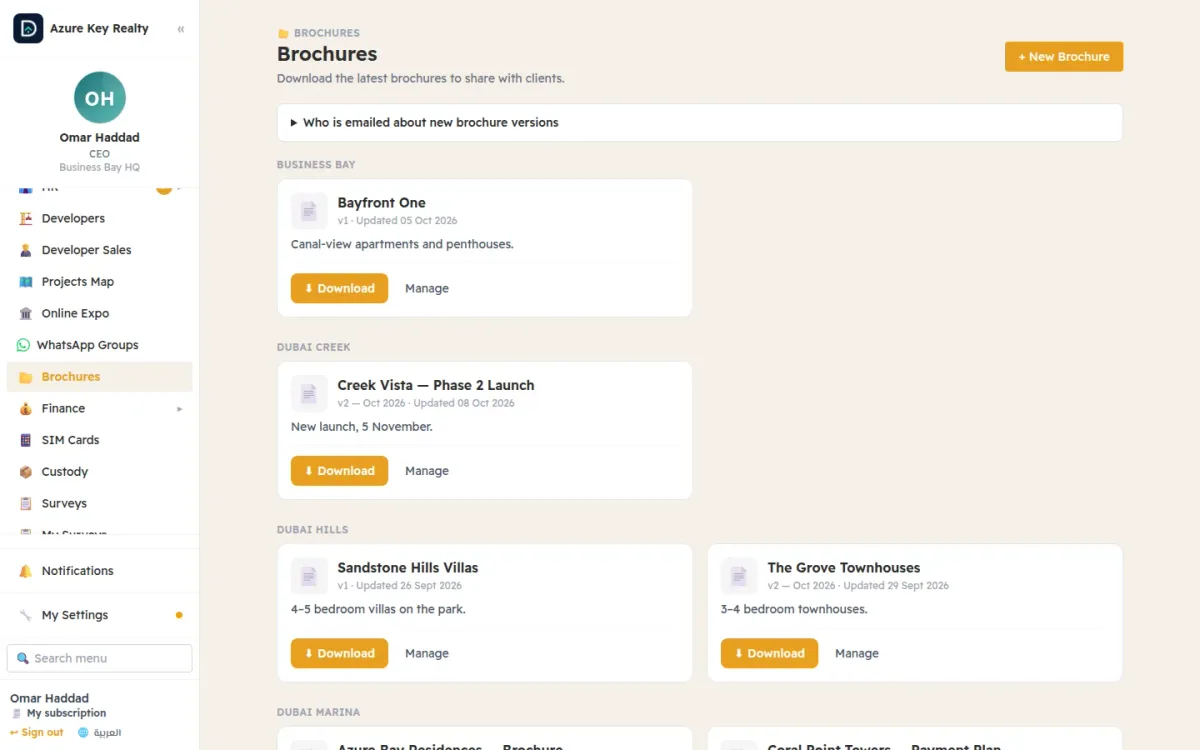
Owner: marketing manager. Due: L-7. The failure to prevent is three versions of the same price sheet circulating in team chats, so a client in the morning sees different figures from a client in the afternoon. Collect the developer's final PDFs, name them consistently and publish them in one library.
The Brochures module keeps each brochure as a PDF under a category, with a version label and last-updated date on each card. When the developer changes the sheet, a manager publishes a new version (PDF up to 100 MB), the previous one moves to the version history, and every download is logged so you can see who used which file. Publishing also emails the departments chosen on the Brochures page. Brochures is on the Growth plan and above.
People and rules: checks 4 to 6
4. A call-first shortlist of qualified clients
Owner: team leaders. Due: L-5. Each team leader picks the clients most likely to act on day one: people who already asked for this unit type, area or budget band, and who answered recently. Keep the list short enough that every name gets a personal call before any broadcast message.
In Dealora's CRM, every client carries requirements such as unit type, budget and project, and a click on a requirement shows everyone who wants the same thing. Tag the shortlist so it is one filter away, and let the call be the first contact. For how to sort clients by readiness, see this Keys of Success article on classifying hot, warm and cold leads in real estate. Record the call outcome in the client's Sales Activity timeline so a colleague can see it.
5. Lead routing rules
Owner: CRM admin. Due: L-5. A launch can bring hundreds of registrations in one weekend. If the sales manager splits them by hand on Sunday morning, the best leads have already spoken to a competitor. Decide before launch who receives what and what happens when someone does not act.
The decisions to make: which team takes launch registrations, how owners are chosen (least loaded, weighted, first in first out or round-robin), whether salespeople may pull extra leads, and how long a lead can sit untouched. In Dealora, pools link tags to salespeople or teams and pick the owner by the strategy you choose, a Leads Bank lets a salesperson press one button to receive unassigned leads within set ceilings, and Pipeline SLA pulls a lead back after a stage's maximum idle time. The reasoning behind each rule is in the guide to real estate lead distribution: rules, time limits and reassignment.
6. Reply standards
Owner: sales manager. Due: L-3. Write down the first-reply time during launch hours, who answers after hours, and what every first reply must contain. Pick a number your team can actually keep, then measure it. A standard nobody checks is a wish.
A workable first reply names the project, answers the question asked, offers the right file and proposes a next step such as a call or a viewing. Brief the team in a short meeting, with two sample replies for the most common questions: price and payment plan, and delivery date. Pipeline Rules in the CRM can require a logged action before a lead moves to the next stage, which turns the standard into something visible.
Messages and roles: checks 7 and 8
7. WhatsApp templates
Owner: marketing manager. Due: submit at L-7, approved by L-2. A free-form (non-template) reply is allowed only within 24 hours of the client's last message. Outside that window, only an approved template gets through, and template messages generally need Meta's approval before they can be sent. Meta's approval time varies, which is why submission comes a week ahead.
Prepare three templates: a launch invitation, a reminder for clients who did not reply, and a post-launch note for those who showed interest. Check their status in the Manage templates panel in WhatsApp Manager, which shows each template's status and, for approved ones, a quality rating. Label the invitation honestly: since 9 April 2025, a template submitted as Utility that WhatsApp judges to be Marketing is approved as Marketing, and a rejected one can be edited, category included, and resubmitted.
Charges apply too. Each business phone number gets 1,000 free service messages a month, which do not roll over, and Meta resumed charging for service messages beyond that from 1 October 2026. Marketing messages are charged per delivered message by the recipient's country, and this varies, so check Meta's current rates before a large send.
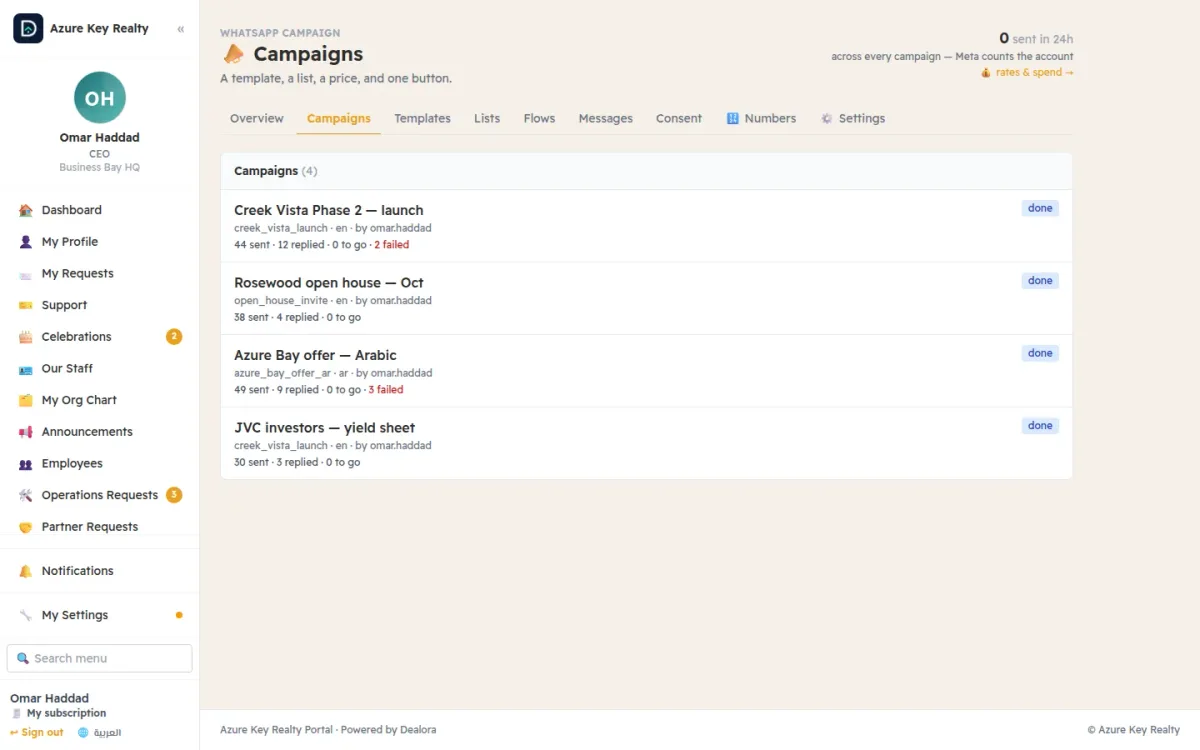
Dealora's WhatsApp Campaign sends one approved template to many clients through your own WhatsApp Business account, only to people with an opt-in on record. It needs the company's own Meta connection (its Facebook page, Instagram and WhatsApp Business number), and it is on the Growth plan and above. Before sending, the module works out how many can be messaged, how many will be skipped and what the send should cost, and afterwards it reports each message as sent, delivered, read, replied, failed or skipped, with the reason. Send a test to your own numbers first.
8. Who sends what to whom
Owner: sales manager. Due: L-2. On launch day, confusion is expensive: two people send different payment plans, a client gets the same message three times, or nobody contacts the developer's sales team when a unit question arises. Write one page that answers four questions.
- Who sends the brochure to a client, and from which library?
- Who sends location and project files, and through which link?
- Who is the single contact with the developer's sales team?
- Who may send a bulk WhatsApp message, and to whom?
Salespeople download the current PDF from Brochures and can send one project file from the Projects Map as a link that works for 14 days. The routine for getting details to a client the same day is in how to send project details to a client. For developer contacts, the Developer Sales index (included on every plan) lists the salespeople at each developer with their numbers, so the team does not collect them from old chats.
Launch day and the first week: checks 9 and 10
9. The launch-day follow-up board
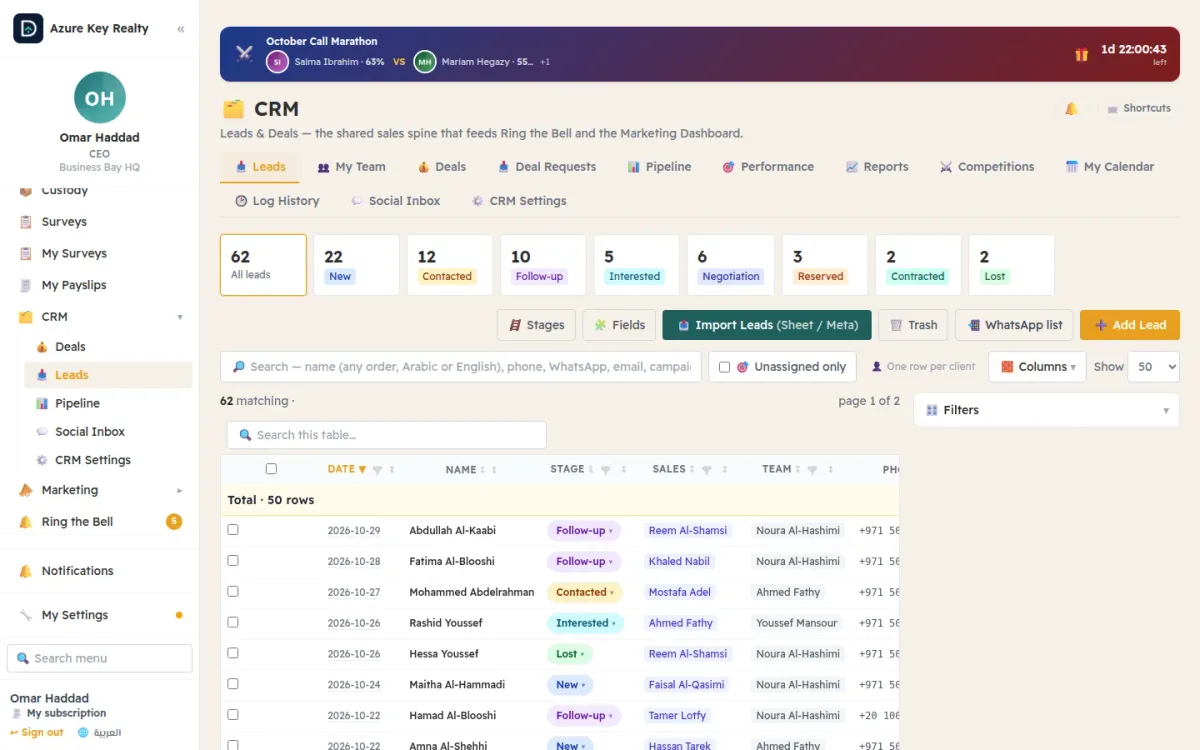
Owner: CRM admin. Due: L-1. Build the board the day before, so on launch day nobody is designing screens. It should show, for every salesperson and team, how many launch clients they hold, how many were contacted, how many have an appointment and how many have sent a deal request. Decide who reads it and when: for example, the team leader at midday and the sales manager at close of day.
In the CRM, the lead list shows stage counts and each client's date, stage, salesperson and team. My Team lets leaders see what each person holds and move clients from one salesperson to another. Pipeline SLA scans for idle leads every 30 minutes, with quiet hours at night, so a lead that nobody touched goes back into distribution. When a deal request comes in for a unit, the CRM Admin approves, holds or rejects it, and a unit can sit on one live deal only, which settles the launch-day argument about who reserved it first.
10. The review after the first week
Owner: sales manager and owner. Due: L+7. Hold a thirty-minute review while the details are fresh. Look at the numbers the board already collects, and ask what to change before the next phase or the next developer.
- How many registrations became distinct clients, and how many of them were answered inside your reply standard?
- How many reached an appointment, an EOI or a deal request?
- Which routing pool or team converted best, and which leads went idle?
- How many WhatsApp messages failed or were skipped, and why?
- Which questions did salespeople have to escalate that a brochure or the project record should have answered?
Dealora's CRM reports count clients rather than registrations, so a buyer who registered three times is not counted three times. Turn each finding into one change with an owner: a corrected brochure version, a new template, a different pool strategy or a sharper shortlist.
To run this list on your own launches, start with what a trial can hold. The free 3-month trial on the Starter plan includes the CRM, Developers & Projects, Projects Map and Developer Sales index, which covers checks 1, 4, 5, 6, 9 and 10 and the location part of check 8. Brochures and WhatsApp Campaign, behind checks 3 and 7, start on the Growth plan.
Sources
Frequently asked
What should a brokerage prepare before a developer's off-plan launch?
Prepare ten things: confirmed project facts and payment plan, the developer's licence status, current brochures, a shortlist of qualified clients to call first, lead routing rules, reply standards, approved WhatsApp templates, a rule for who sends what to whom, a follow-up board for launch day, and a review after the first week.
How early should the sales team start launch preparation?
Start about ten days before launch day. Project facts and licence status come first because everything else depends on them. Submit WhatsApp templates about a week ahead so Meta's approval does not hold up the invitations, and build the follow-up board the day before. These are working defaults, not fixed rules.
Why do WhatsApp launch messages need approved templates?
A non-template reply is allowed only inside the 24-hour window that opens when a client messages you. To invite many clients who have not written recently, you need templates that Meta has approved. Submit them early, and label a promotional invitation as Marketing, because Meta can reclassify a Utility template it judges to be Marketing.
Who should own each item on the launch checklist?
Give every check one named owner. Typically the sales manager owns facts, the shortlist and reply standards. The marketing manager owns brochures and templates. The CRM admin owns routing and the board. Team leaders own their shortlists. A check with two owners tends to have none on launch day.
What should we review one week after an off-plan launch?
Review how many registrations became clients, how fast each was first answered against your standard, how many reached appointments and EOIs, which routing pool performed, and which WhatsApp messages failed or were skipped. Then fix the brochure, templates and routing for the next phase while the launch is still fresh.
Read next
- How to Send Project Details to a Client: A Same-Day Routine A fixed order for brokers: find the project on the map, pick the current files, send them from one place and r
- How to Test a CRM Free Trial: A 30-Day Plan for Brokerages A week-by-week 30-day plan for brokerage owners: import real leads, run the pipeline with real reps, check dev
- Selling Off-Plan Property in Dubai: Team Roles and Follow-Up Selling off-plan property in Dubai with several developer launches running at once needs clear roles, lead rul
- Real Estate Software UAE: A Buying Guide by Brokerage Size How a UAE brokerage should choose its software: match the tool to team size, then test Arabic and English use,