AI Chat Agent for a Real Estate Brokerage: Test, Trust, Go Live
By Dealora Published Reviewed by Ali Darwish 10 min read
One AI agent can answer property customers on Instagram, Messenger, WhatsApp and TikTok, but only if you give it the right inputs and test it first. Here is what it needs, how to trust it and when to go Live.

An AI chat agent for a real estate brokerage can answer customers on Instagram, Messenger, WhatsApp and TikTok from the company's own written Knowledge. It needs that Knowledge, the company's Meta connection and the AI Sales Agent add-on. Test it first in the Try it chat, where nothing is sent to anybody, then go Live.
An AI chat agent for a real estate brokerage can answer property inquiries on Instagram, Messenger, WhatsApp and TikTok from one place, and you can trust it if you control what it is allowed to say and test it before it talks to a single customer. Dealora's Chat Agent is built that way: it answers only from your company's own written Knowledge, has a Try it chat that sends nothing to anybody, and passes only real customers to the CRM. Dealora is sold to real estate companies in Egypt, Saudi Arabia and the United Arab Emirates, and the agent replies in Arabic or English to match the customer.
Can one AI agent really cover four social channels?
For the brokerage inbox, yes. The Chat Agent reads Instagram, Messenger, WhatsApp and TikTok messages, decides first who is writing (customer, job seeker, HR request, developer, operations or other) and replies in the customer's own language, Arabic in their dialect or English. Replies stay short, the way a person types on Instagram. Because customers often write in bursts of three or four short lines, the agent waits for a short pause and answers the whole burst once.
The channels are not identical, though, and the differences come from the platforms, not from Dealora.
- Messenger and Instagram: a business can respond inside the standard messaging window, which lasts 24 hours for most user actions. After a person sends a first message from a Click-to-Messenger or Click-to-Direct ad, the window may last up to 7 days from that message. Messages inside the window may contain promotional content.
- WhatsApp: when a user messages or calls the business, a 24-hour customer service window opens and resets to 24 hours each time the user writes or calls again. While it is open the business can send free-form messages; once it closes, only pre-approved template messages can be sent. Businesses can message only users who have opted in.
- TikTok: the Business Messaging API lets authorized TikTok Business Accounts exchange direct messages through integrated platforms, but it is in Open Beta in APAC, LATAM, METAP and North America, so availability depends on your region. It supports only accounts with Advanced Access or Verified Business Accounts, and developers cannot call it for accounts signed up in the EEA, Switzerland, the UK and, without the US data security review, the US. Whether your TikTok account can use the agent follows those conditions.
So the honest answer is one agent and one Knowledge, with the platform rules deciding how each channel behaves. Check your own TikTok account's eligibility before you count it as a covered channel.
What an AI chat agent for a real estate brokerage needs before it works
The agent is not a switch you flip on a free account. It has three inputs and sits on specific plans.
| Requirement | What it means in Dealora |
|---|---|
| The company's Knowledge | The text your team writes and the agent may use: general, projects, payment, company, careers, developers and policies. |
| The company's own Meta connection | Its Facebook page, Instagram account and WhatsApp Business number. A Meta connection setup add-on is available from Starter. |
| The AI Sales Agent add-on | The Chat Agent works only alongside it. The add-on is available from Starter and is charged as a monthly subscription plus the calls it makes. |
| The plan | The Chat Agent is on Growth, Business and Enterprise, and it is charged by use as well. |
Why the AI Sales Agent add-on is required
The dependency on the AI Sales Agent surprises some owners. That add-on phones clients by AI, keeps the recording and transcript, and scores each call as hot, warm or cold with quotes from the client. You do not have to run call campaigns to have the chat agent, but the add-on must be on the account. Ask what you will be charged by use before you commit.
What the free trial covers
The free 3-month trial is on the Starter plan and holds Employees, CRM, Developers & Projects, Projects Map and the Developer Sales index. The Chat Agent is not part of it, so you judge it from its page and a talk with the Dealora team about the right plan. The pricing page shows how each plan is offered.
How to build the Knowledge an AI chat agent answers from
The agent is only as good as what you write for it. It answers from the Knowledge your team writes, plus company facts the portal already holds: the company profile, active branches, the careers page and the WhatsApp number. It does not guess. If a price, payment plan, delivery date or discount is not in the Knowledge, the agent will not say one. It tells the customer a colleague will reply and hands the conversation to a person.
That makes the Knowledge the real product decision. A practical way to fill it:
- Start from the questions already in your inbox. Scroll back through a month of Instagram and WhatsApp messages and list the ten questions that repeat: location, unit types, payment terms, handover, how to book a viewing.
- Write each answer once, in plain sentences, under the right group: projects for project facts, payment for payment plans, company for who you are, policies for what you do and do not do.
- Put only current facts in. An out-of-date payment plan in the Knowledge becomes an out-of-date payment plan in front of a customer.
- Leave out what you want a person to say. Negotiation, discounts and exceptions are better as handoffs than as written answers.
- Give marketing and sales one owner for edits. Access is granted by level (view, handoffs, knowledge and settings), so the people who edit Knowledge need not be the people who change settings.
Testing the chat agent before going live
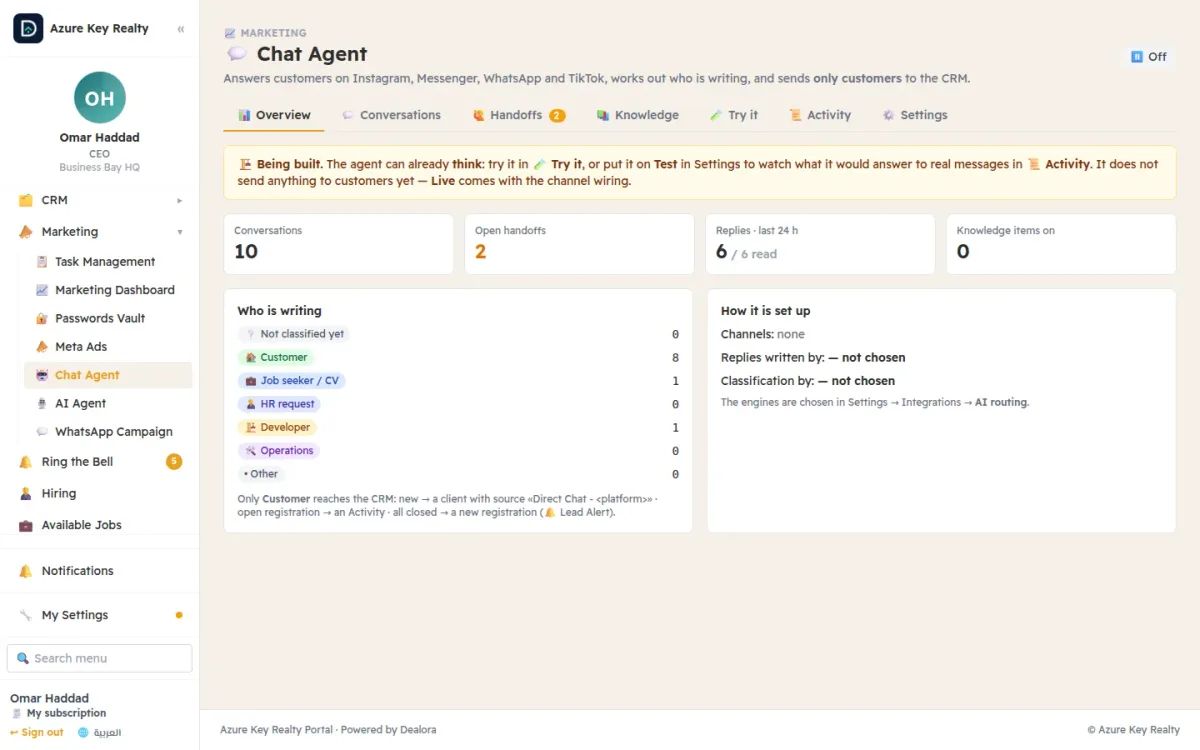
Testing is where trust is earned. The Try it screen is a test chat that uses the real Knowledge, and nothing is sent to anybody. Customers see nothing, while you see what the agent would say to a given question, in what language and at what length.
Use it with the questions you collected from your own inbox. Activity and Settings show the agent's runs, the mode, the channels and the company facts, so you know what the agent is set up to use. When you read the answers, check these points:
- Did every answer come from something your team actually wrote?
- Where the Knowledge had no answer, did the agent say a colleague will reply?
- Did it answer in the language you asked in, Arabic or English, and at a sensible length?
- Did it avoid any price, payment plan, delivery date or discount that is not in the Knowledge?
Fix problems in the Knowledge, not by hoping. If an answer is wrong, find the sentence that caused it, correct it and ask the same question again.
When to switch the AI agent to Live
Between the two there is a middle step. Put the agent on Test in Settings: it reads every new message on the chosen channels and writes the answer it would send in the Activity log, without sending anything or filing anything in the CRM. Switch to Live when those answers to real messages have stopped surprising you, not on a date. A reasonable standard is that you have tried a full range of questions: location, payment, handover, Arabic and English, questions the Knowledge deliberately does not answer, and the kind of messages a non-customer would send. Then agree on these before the change:
- Named owners for handoffs. In Live, the agent answers customers itself and hands unknown questions to a person. Someone must own that list every day.
- A first-week review. Open Conversations every day after you go Live and check how each sender was classified: job seekers, developers and suppliers should sit apart from customers. Read the Activity log too.
- A rule for what stays human. Decide which topics always go to a salesperson, and keep them out of the Knowledge.
The standard for how quickly a person follows up still applies. The agent shortens the first reply, not the follow-up. A reply standard you can enforce is covered in Speed to Lead Real Estate.
Who answers first: the Chat Agent or the Social Inbox?
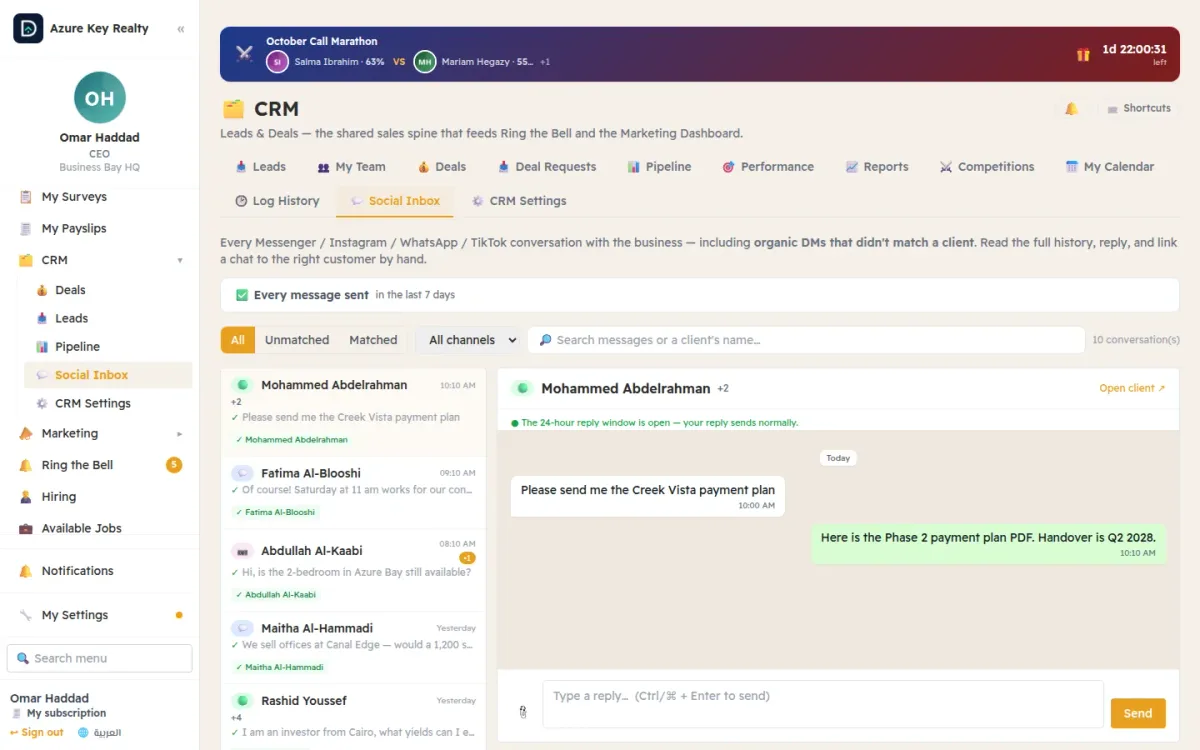
Both read the same Messenger, Instagram and WhatsApp conversations, but they do different jobs. The agent answers and sorts. The Social Inbox, which is on Growth and above, is where people work.
| Chat Agent | Social Inbox | |
|---|---|---|
| Role | First responder and sorter | Where salespeople and inbox admins handle conversations |
| Replies | Answers customers from the Knowledge in Live | Salespeople type free-form replies while the 24-hour window is open |
| When the window closes | Platform rules apply to any free-form reply | The button becomes Log sent: the salesperson messages from their own phone and Dealora records it |
| Unknown senders | Classified (customer, job seeker, developer and so on); unknown questions go to Handoffs | Link to a client searches by name, phone or email |
| Oversight | Handoffs list and Activity log | Failed sends with the reason and the fix |
In practice the agent takes the first message, including the one at eleven at night, and the salesperson takes over when the conversation needs judgment. On WhatsApp, the salesperson holding the client's earliest open registration answers the conversation. Plan follow-ups inside the 24-hour window or by phone.
How the agent hands over only real customers
A brokerage inbox holds CVs, developer account managers, suppliers and staff questions next to buyers. If all of them become leads, the pipeline fills with people who will never buy. The Chat Agent classifies each conversation first, and only a customer is sent to the CRM. Job-seeker and developer messages stay out of sales and can be handled by HR and operations.
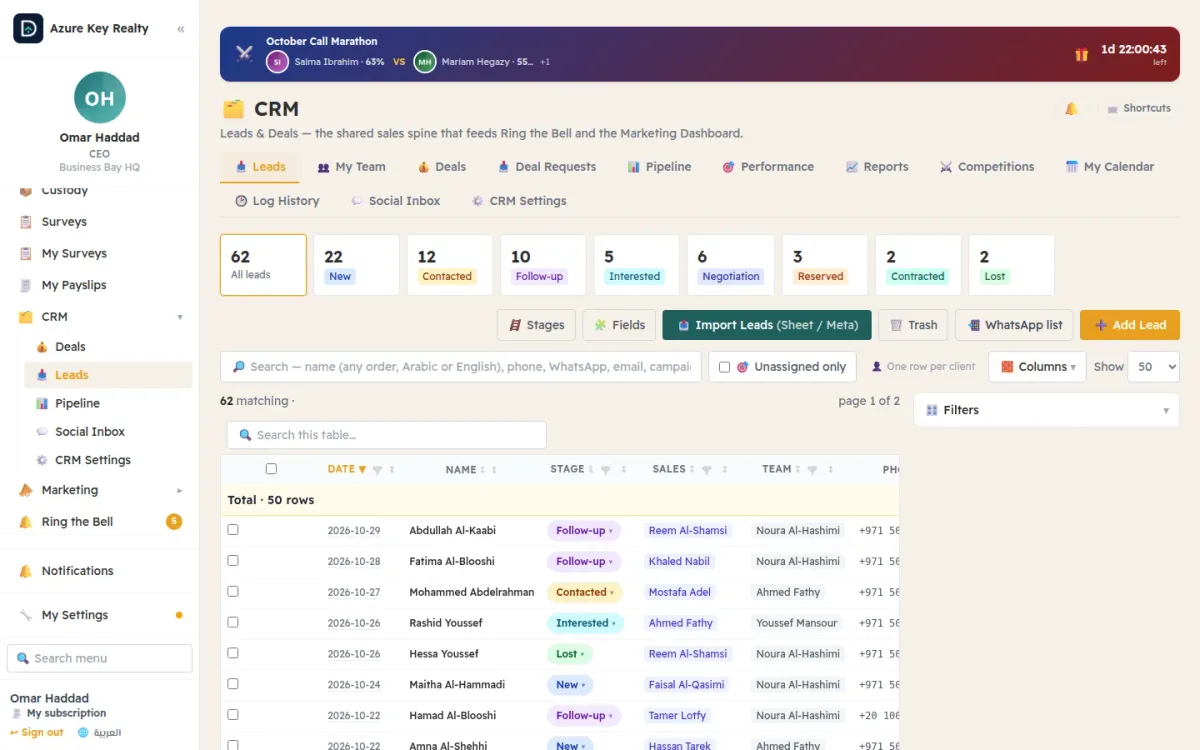
Questions the agent cannot answer land in Handoffs, where a person can answer, dismiss or take the conversation over. Once customers arrive in the CRM, how you assign them matters as much as how you answer them; the rules are in Real Estate Lead Distribution.
Messaging windows and charges to plan for
Platform charges change what an always-on agent costs you, so they belong in the decision. Since 1 October 2026, WhatsApp service messages (free-form replies inside the 24-hour window sent through the Cloud API) are charged after the first 1,000 per business phone number each month. Those first 1,000 are free, and customers' incoming messages stay free. For eligible government and non-profit organizations, service messages stay free beyond the monthly free tier from 1 October 2026 through 31 December 2027, and Meta decides who is eligible.
Count your own volume: the number of customer conversations per WhatsApp number per month tells you whether the free tier covers you. Ads change the pattern too. If you run click-to-message campaigns through the Meta Ads module (included in Enterprise, an add-on from Growth), conversations that start from an ad may have a longer window on Messenger and Instagram, up to 7 days.
A short decision checklist
- Do you have a Meta connection with your own Facebook page, Instagram account and WhatsApp Business number?
- Is your team ready to write Knowledge and keep it current?
- Have you accepted that the Chat Agent is on Growth and above, needs the AI Sales Agent add-on and is charged by use?
- Does someone own the Handoffs list every day?
- Is your TikTok account in a region and account type the platform supports?
If the answers are yes, start by creating a free Dealora account on the Starter plan, free for 3 months, and set up the CRM your customers will land in. Then talk to the Dealora team about the plan that includes the Chat Agent. For a second view of the setup steps, the Keys of Success guide AI Agent for Instagram and TikTok Messages walks through a six-step setup.
Sources
Frequently asked
Can one AI agent reply to property customers on Instagram, Messenger, WhatsApp and TikTok?
Yes, Dealora's Chat Agent works on all four channels from one set of company Knowledge. Messenger, Instagram and WhatsApp need the company's own Meta connection. TikTok depends on TikTok's own conditions: its messaging API is in Open Beta in some regions and supports only eligible business accounts.
What does an AI chat agent for a brokerage need before it can answer?
It needs three things: the company's written Knowledge (projects, payment, company, policies and more), the company's own Meta connection, and the AI Sales Agent add-on, which the Chat Agent only works alongside. In Dealora the Chat Agent itself is on Growth and above and is charged by use.
How do you test the agent before it talks to customers?
Use the Try it screen, a test chat that answers from the real Knowledge and sends nothing to anybody. Ask the questions your customers ask, read the answers, fix the Knowledge where an answer is wrong or missing, and ask again. Then put it on Test, which writes the answer it would send to real messages in Activity without sending it, and switch to Live when those answers stop surprising you.
Will the agent make up prices or discounts?
It is built not to. It answers from the Knowledge your team wrote and from company facts the portal holds, and it never invents a price, a payment plan, a delivery date or a discount. When the answer is not in the Knowledge, it says a colleague will reply and hands the conversation to a person.
Does the AI agent replace the Social Inbox?
No. The agent answers first and sorts who is writing; the Social Inbox is where salespeople reply to their own clients, link unknown senders to client records and see failed sends. The Chat Agent works on the Social Inbox's channels for Messenger, Instagram and WhatsApp.
Read next
- Software for a 20 Agent Brokerage: What to Require A requirements list for a brokerage of about 20 agents: what the software must do on day one, what can wait, h
- PropSpace Alternative for UAE Brokerages: Cost Model and Tests A decision guide for UAE brokerage owners leaving per-user pricing: a yearly cost model at your own headcount,
- Real Estate Software Saudi Arabia: A 10-Point Buying Checklist A buying checklist for Saudi brokerage owners: Arabic and English screens, WhatsApp and Instagram leads, Meta
- Aqar+ Alternative: 7 Checks for Egyptian Brokerages of 20-150 Reps A practical way for Egyptian brokerages with 20 to 150 salespeople to judge any Aqar+ alternative: a seven-che