
Real Estate Software Demo Questions: A Checklist for Brokerage Owners
By Dealora Published Reviewed by Ali Darwish 11 min read
A demo checklist for brokerage owners: five of your own scenarios, tasks the vendor must perform live, what a good answer sounds like, red flags and a scoring sheet to compare vendors.
The best real estate software demo questions are tasks, not descriptions. Bring a sample of your own lead file and five real scenarios, then make the vendor perform each one live: duplicate leads, distribution, targets, campaign reporting, Arabic and English, data export and rollout. Score every area from 0 to 5 straight after the demo.
The best real estate software demo questions are tasks, not descriptions. Bring a sample of your own lead file and five real scenarios from last month, then make the vendor perform each one live on screen. A feature that appears only on a slide, or arrives "in the next release", should be scored as missing. A brokerage software demo is an exam for the vendor, and you write the paper.
Prepare your own data and five scenarios first
A vendor's demo account is always tidy: unique phone numbers, perfect spelling, one language. Your real files are not. Send a sample of your lead export a few days ahead, with names and numbers masked if you prefer, and include the messy rows: the same buyer twice, an Arabic name, a phone number typed with spaces.
Then choose five scenarios from your own recent weeks. Good ones usually look like this:
- A campaign for a new compound brings two hundred registrations over a weekend and someone has to split them before Sunday morning.
- One buyer fills three forms and lands with three different salespeople.
- A consultant resigns while holding dozens of open leads.
- Two salespeople want the same unit on the same day.
- The owner asks which campaign produced closed deals last quarter, not just leads.
Invite the sales manager and the marketing manager, not only the owner. Ask for one scenario where you hold the mouse. If the person from your team cannot complete a task without the vendor's hints, that is information about the daily experience.
Real estate software demo questions on leads and pipeline
This is the area that decides most purchases, so give it the most time. Ask the vendor to do these live:
- Import your sample file and show what happens to the buyer who appears three times.
- Create a distribution rule, let three new leads arrive and explain why each went to the person it did.
- Leave one lead untouched and show what the system does about it after the time limit.
- Try to move a lead to the next stage without any logged action, then show how you would require one.
- Open a deal request on a unit that already has a live deal.
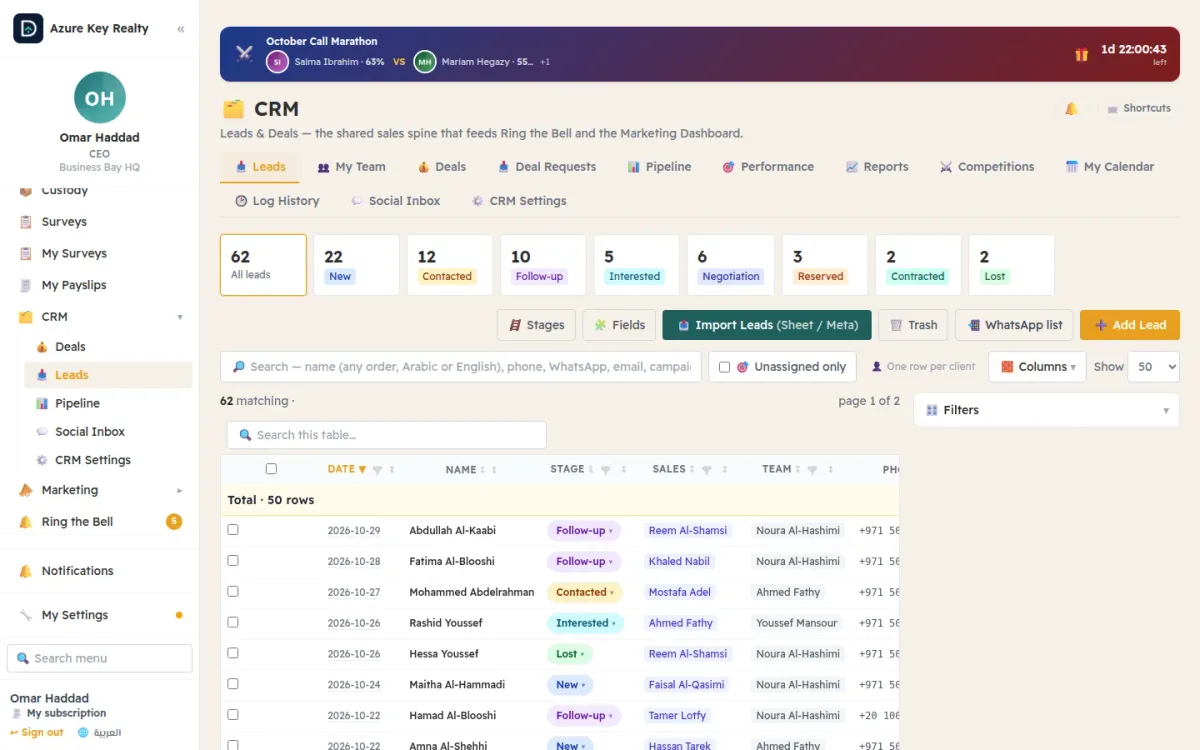
What a good answer sounds like: specific and visible. For example, in Dealora's CRM every phone number and email is matched to one client, so a person who registered three times is one row with three requests behind it. Pools assign owners by a strategy (least loaded, weighted, first in first out or round-robin), and Pipeline SLA pulls a lead that sits idle too long, scanning every 30 minutes with quiet hours at night. A vendor does not need to match that exactly, but their answer should be as concrete. The fuller logic of rules and reassignment is in our guide to real estate lead distribution.
Red flags:
- Duplicates are only "flagged" on a report days later instead of merged on arrival.
- Redistribution is manual, or depends on someone remembering to check.
- Every answer starts with "we can customize that" and none ends with a demonstration.
- Changing a stage or a rule needs a paid developer.
If you want a reference for what a sensible setup looks like, the Dealora CRM page lists what it covers, and the step-by-step CRM setup shows the order in which brokerages usually configure it.
Team and targets: what managers and salespeople see
A CRM can hold perfect data and still fail if the wrong people see the wrong things. Ask the vendor to log in as three different roles during the demo: a salesperson, a team leader and the owner.
- As the team leader, show what each person on the team holds right now.
- Move all clients of one salesperson to another in a single action.
- Find clients still held by someone who left, and pull them back.
- Set a monthly target for one salesperson and one team, then show progress against it.
- As a salesperson, show what you cannot see or change.
A good answer shows permissions by role, not one screen for everyone. Mass transfer and pull-back should take minutes, because a resignation does not wait for a ticket to the vendor. Red flags are a single admin who must do everything, or targets that live in a separate spreadsheet "linked" by export.
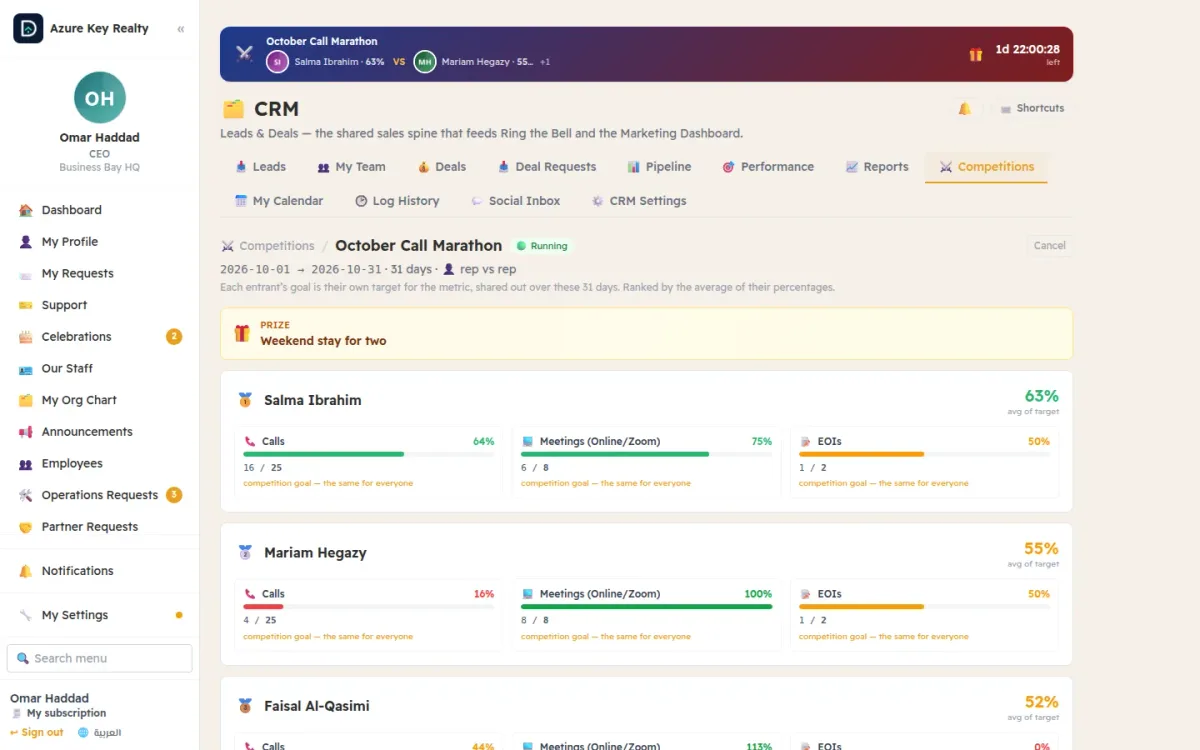
If friendly competition is part of how you run the team, ask to see one live. Sales competitions with a target, a deadline and a winner are in Dealora's Competitions module, which starts on the Growth plan.
Marketing reporting: from ad spend to closed deal
Marketing managers should ask the questions in this section, because they will live with the answers. The core test is whether a lead keeps its campaign name all the way to a signed deal.
- Show one lead from a Meta ad form to a contracted deal with the source still attached.
- Type in a spend figure for a campaign and show cost per lead and return on ad spend.
- Show the same report counting clients, not registrations, so duplicates do not flatter the numbers.
- Show how a lead from the website, a walk-in and an ad form appear side by side.
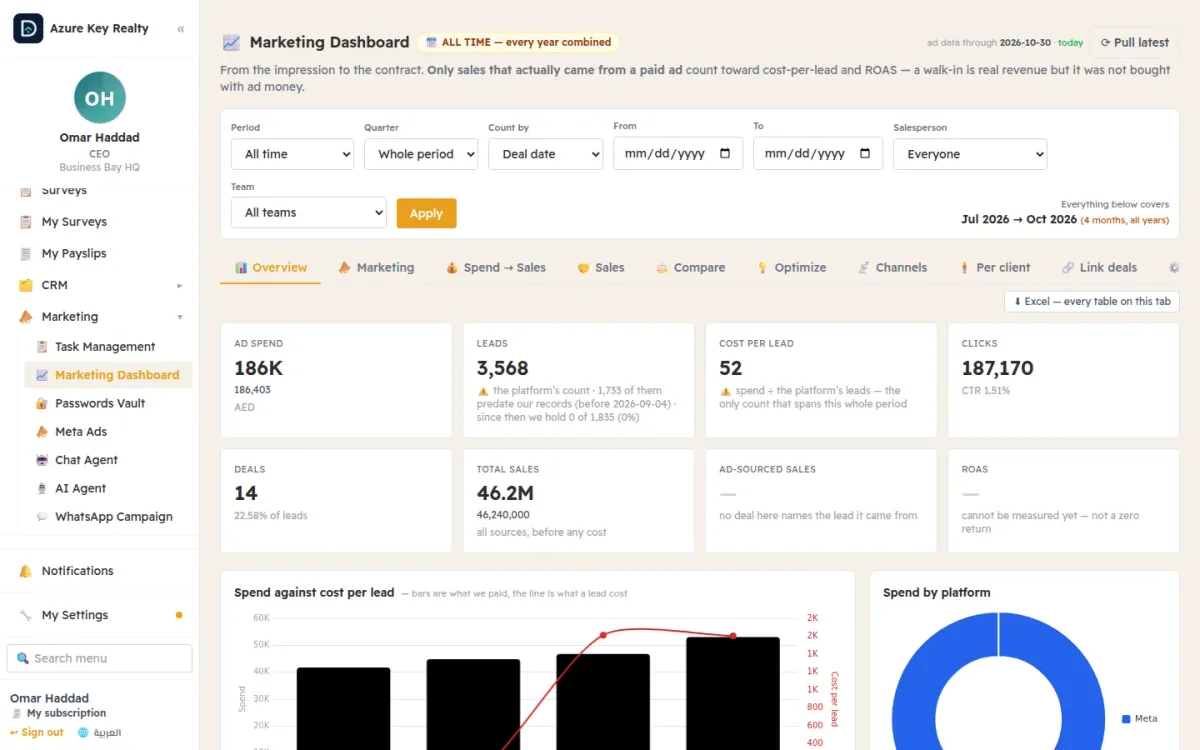
A good answer follows the path from spend to leads to sales on one screen and says plainly where each number comes from. Dealora's Marketing Dashboard, for instance, covers spend, leads, cost per lead and return on ad spend, and it is on the Growth plan and above. The method behind it is laid out in how to track leads from Meta ads to closed deals.
One more question belongs here: who pays for WhatsApp? Since 1 October 2026 Meta has charged per message for service messages, meaning free-form replies inside the 24-hour customer service window. Each business phone number gets 1,000 free service messages a month, charging starts at the 1,001st, and unused messages do not roll over. Utility templates sent inside an open service window are also charged since the same date. The rates are Meta's and can change, so ask every vendor whether the charge passes through to you, where it appears and whether the system warns you before the free tier runs out.
Red flags: reports built on registrations, "we integrate with everything" without a live connection on screen, and a vendor who has not heard of the October 2026 change.
HR and operations, if you want one system for both
Skip this section if you only need a sales tool. If you want to replace separate HR tools, ask for live tasks again: add a new hire and show every step handed to a named person, record a leave request and its approval, and show how a salary run reads sales results. Plan matters here: in Dealora, Attendance & Leave and Employee Lifecycle are on the Business plan and above, and Payroll is on the Enterprise plan.
A good answer shows the HR data and the sales data in one place, so that a resignation in HR triggers the client pull-back in the CRM. A red flag is "HR is a separate product from a partner" with a separate login and a separate employee list. The trade-offs of consolidating are covered in the real estate tech stack audit.
Arabic and English: test the language, not the label
Many products translate menu labels and stop there. Ask the vendor to switch language in the middle of a task and watch what changes.
- Enter a client name in Arabic and search for it again.
- Show the page right to left, with the layout mirrored and not just the text.
- Show an Arabic notification, an Arabic report heading and an Arabic message template.
- Open a document that exists in both languages for the same employee or client.
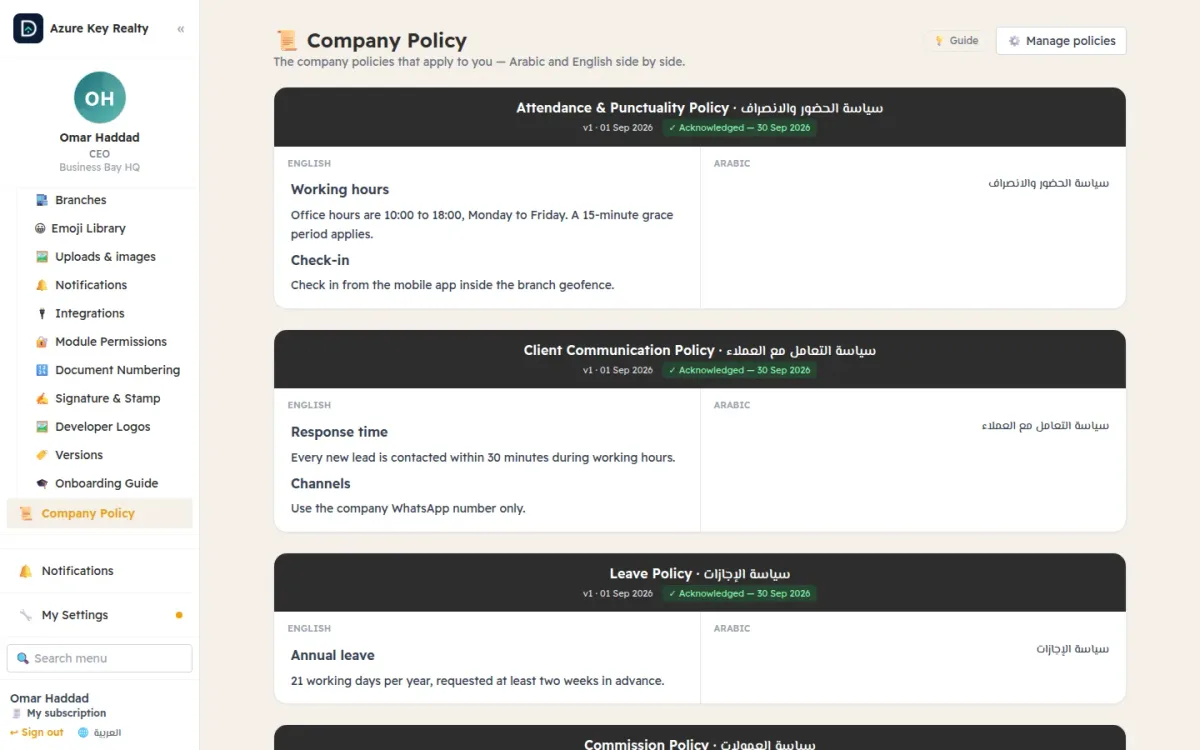
A good answer treats both languages as equal: the same screens, the same data, the same reports. Dealora is built in Arabic and English, and the Company Policy module, for example, shows each policy in both languages side by side with acknowledgement status (it is on the Business plan and above). The red flag is Arabic data that displays as broken characters in exports, or English-only reports for the owner.
Data ownership, export and privacy
This is the section vendors like to rush. Your lead database is the company's main asset, so ask three things and insist on seeing them: where the data is stored, how you take all of it out, and how a single person's data is deleted.
- Export your whole client list and deal history to a file and open it on the spot.
- Delete or correct one client's record and show the log of who did it and when.
- Show which country the data is hosted in, and what happens to it if you cancel.
Check plan limits too. In Dealora, data export starts on the Growth plan; the Starter and Individual plans have none. Ask every vendor which plan unlocks export, and what it costs at the size of your team. Prices are on the pricing page.
The laws in your markets make these questions practical, not theoretical. Check the current text of each before you sign, because some of it is still moving:
- Egypt: Personal Data Protection Law No. 151 of 2020 gives people the right to be informed of, access and obtain their data and to ask for its correction, modification, deletion, addition or updating. A request to a holder, controller or processor must be answered within six working days, and the executive regulations expect requests and actions to be logged.
- UAE: Federal Decree-Law No. 45 of 2021 came into force on 2 January 2022. Under Article 14 a person can ask for their data to be transferred to another controller where technically feasible, which is exactly the export question above.
- Saudi Arabia: the Personal Data Protection Law was issued by Royal Decree No. M/19 dated 16 September 2021, and SDAIA is the regulator. SDAIA ran a public consultation on draft amendments to the Implementing Regulation from 6 October to 5 November 2026. They are drafts and not in force. One draft article would require controllers to store personal data inside Saudi Arabia, while the law today has no general localization requirement. Another would treat a data subject request not met within 30 days (extendable by 30 days) as rejected.
A good vendor answers with where the data sits, what export file you receive and how deletion is logged, and knows which of these rules applies to your clients. A red flag is "your data is safe with us" with no export on screen.
Support and rollout: ask for dates and names
Software that is bought well and rolled out badly still fails. Ask what happens in the first month, and ask for it in writing.
- Who imports your existing leads, and who checks the import with you?
- Who trains the sales team, in which language and in how many sessions?
- What is the support channel, in what hours, and in which language?
- What does the vendor need from you, and by when?
- If a setup step slips, who is responsible?
A good answer names people and a sequence. A red flag is a plan with no dates and no owners, or a rollout that begins only after the contract is paid in full and nobody can say how long it takes. Ask to speak to a brokerage of your size that has been through it, and for what went wrong, not only what went well. For a sensible order of work, use the checklist of features to look for in real estate management software.
A scoring sheet to compare vendors afterwards
Fill this in within an hour of each demo, while the details are fresh, and do it with your managers separately before comparing notes. Score each area from 0 to 5: 0 means it could not be done, 1 means it was only described, 3 means it was done with the vendor's help, and 5 means it was done live with your data and without help. Multiply the score divided by 5 by the weight.
| Area | Suggested weight | Vendor A (0-5) | Vendor B (0-5) | Vendor C (0-5) |
|---|---|---|---|---|
| Leads and pipeline | 25 | |||
| Team and targets | 15 | |||
| Marketing reporting | 15 | |||
| Arabic and English | 10 | |||
| Data ownership and export | 15 | |||
| Support and rollout | 15 | |||
| HR and operations | 5 |
The weights total 100. Move them to fit your business: if HR is a main reason to switch, raise it and lower something else, but decide the weights before the first demo so that a charming presenter does not change them. Add a line for total cost at your team size on the plan you actually need, and a line for any red flag you refuse to accept, such as no data export.
Try Dealora yourself with your five scenarios
You do not need to wait for a demo to test Dealora. Every new company gets a free account for 3 months on the Starter plan, which holds Employees, CRM, Developers & Projects, Projects Map and Developer Sales index without data export. Open the account, add a few of your real leads, run the lead and pipeline scenarios above on your own team, then fill in the scoring sheet as you would for any vendor. If you need a module above the Starter plan, ask the Dealora team which plan includes it before you subscribe.
Open your free account, or contact the Dealora team if you have a question first. If you are still deciding what to compare against, the Keys of Success real estate CRM comparison lists eight checks to run before you buy.
Sources
Frequently asked
What questions should I ask in a real estate software demo?
Ask for tasks, not explanations: import a sample of your leads and show what happens to duplicates, distribute new leads by a rule, pull back an idle lead, set a target per salesperson, report cost per lead by campaign, switch to Arabic mid-flow and export your data. Whatever the vendor cannot do on screen counts as missing.
How many vendors should I demo?
Two or three is enough for most brokerages. Run the same five scenarios, with the same sample data and the same people in the room, so the scores can be compared. More than three demos tends to blur the differences and delay the decision.
Who from my company should attend the demo?
The owner, the sales manager and the marketing manager at minimum, plus someone from HR if you want to replace separate HR tools. A salesperson who will use the system daily is also valuable, because they notice the extra clicks that managers miss.
Should I use my own data in a software demo?
Yes. A sample of your real lead export, with names and phone numbers masked if you prefer, shows how the system treats duplicates, Arabic names and odd formats. Vendor demo data is always clean, so it proves little about your daily work.
What are the biggest red flags in a CRM demo?
The vendor says an item can be customized but cannot show it, reports count registrations instead of clients, export is described as available later, Arabic works only for labels, and the rollout plan has no dates or named owners.
Do WhatsApp message charges matter when comparing software?
Yes. Since 1 October 2026 Meta charges for service messages beyond 1,000 free per business number each month, and for utility templates sent inside an open service window. Ask each vendor who pays these charges and where they appear, because rates vary and Meta can change them.
Read next
- How to Test a CRM Free Trial: A 30-Day Plan for Brokerages A week-by-week 30-day plan for brokerage owners: import real leads, run the pipeline with real reps, check dev
- Software for a 20 Agent Brokerage: What to Require A requirements list for a brokerage of about 20 agents: what the software must do on day one, what can wait, h
- How to Scale a Real Estate Brokerage: Systems at 20, 50, 100 Reps A stage-by-stage map of the systems a brokerage needs at about 20, 50 and 100 salespeople: what breaks at each
- Real Estate Sales Dashboard: 3 Views Every Manager Needs One screen, three views: agent, team and project or developer. Which number goes where, who reads it, and whic