
Real Estate Tech Stack: A Tool-by-Tool Audit for Brokerage Owners
By Dealora Published Updated Reviewed by Ali Darwish 13 min read
A brokerage software audit, tool by tool: the signs a spreadsheet, chat group or HR app can be replaced, what to check before you drop it, what stays outside, and the order to roll out.

Audit your real estate tech stack by listing every tool, who uses it and what data lives in it. For each one, look for signs it can be replaced, check that its data can move and its rules can be matched, and note what must stay outside. Roll out in order: CRM first, payroll last.
A real estate tech stack is every tool a brokerage uses to run leads, deals, messages, people and marketing. Most brokerages never designed theirs: it grew from one spreadsheet, a few WhatsApp groups and whichever subscription a manager signed up for last year. The audit below goes through each common tool, names the signs it can be replaced, what to check before you drop it, and what has to stay outside any single platform.
How to audit your real estate tech stack
Start with a plain list. Write down every tool the company uses, including the free ones and the ones that live on personal phones. For each, record who uses it, who owns it, what data sits inside it and what it costs in money and in hours of copying between tools.
Then ask three questions of every line on the list:
- Signs it can be replaced: the symptoms that show the tool is costing you more than it gives.
- What to check before dropping it: whether the data can move, whether the rules can be matched, and who has to change a habit.
- What stays outside: the part of the job the replacement will not do, so no one assumes it is covered.
A tool that fails the first question and passes the second is a candidate for the first wave. A tool that fails the third, such as a specialist you love, stays where it is.
The tools a brokerage can replace, at a glance
| Current tool | Replaced by (Dealora module) | Main sign it is time | What stays outside |
|---|---|---|---|
| Lead and deal spreadsheets | CRM | The same buyer appears on several rows | Accounting records |
| WhatsApp groups, Instagram and Messenger on personal phones | Social Inbox | Chats leave with the salesperson | Calls and meetings held face to face |
| Hand-built ad reports | Marketing Dashboard | Cost per lead counts walk-ins | Creative work in the ad platform |
| Posting plans in chat groups | Task Management | Nobody knows which version is final | Design and video software |
| Sign-in sheets and leave on WhatsApp | Attendance & Leave | Deductions become arguments | The posted work schedule and legal advice |
| Salary spreadsheets | Payroll | A figure changes after the employee saw it | Bank transfers and accounting |
| Passwords in notes and chats | Passwords Vault | Logins leave with former staff | Personal passwords |
Plans: the CRM is on every plan; Social Inbox, Marketing Dashboard and Task Management start at Growth; Attendance & Leave and the Passwords Vault start at Business; Payroll is on Enterprise.
Spreadsheets for leads and deals
Signs it can be replaced
A campaign brings in two hundred registrations over a weekend and someone pastes them into a sheet. The sales manager splits them on Sunday morning, and by then the best leads have spoken to a competitor. The same buyer registered on three forms and sits with three salespeople, and one consultant holds forty leads nobody has called.
What to check before dropping it
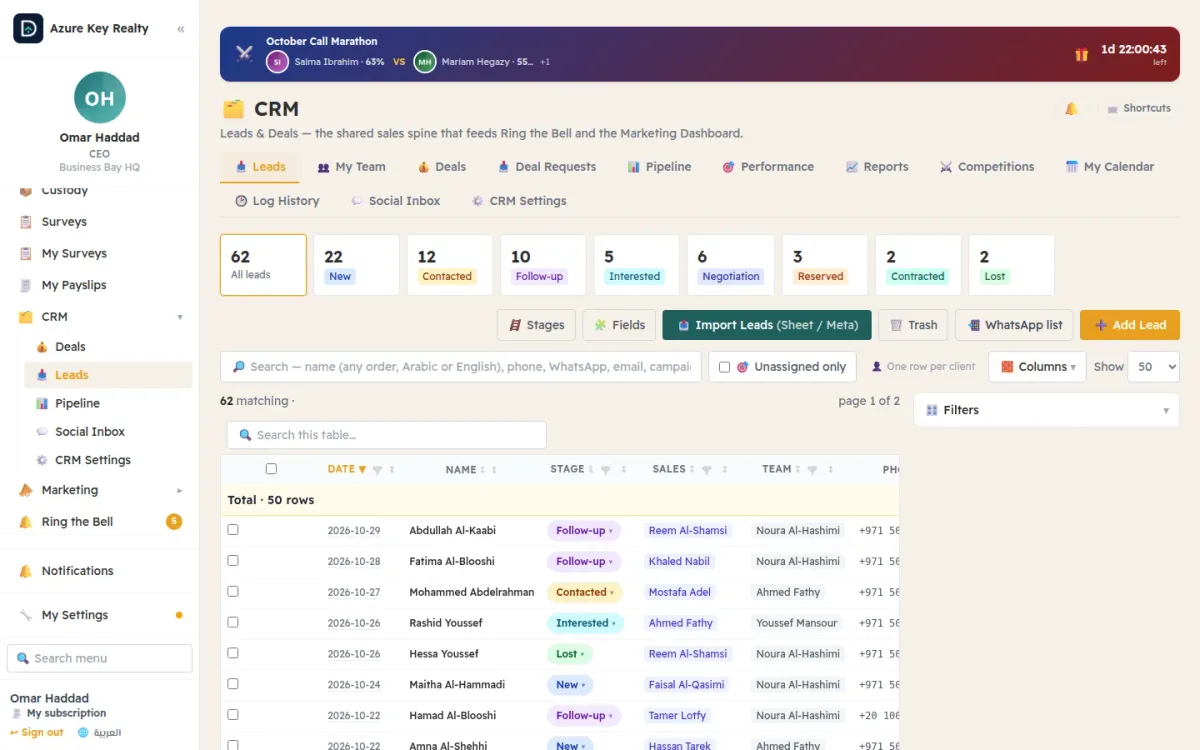
Export every sheet and look at the columns that matter: phone, email, source, project, budget and the owner. A CRM matches each phone number and email to a single client, so duplicates will merge. That is the point, but decide in advance which owner wins when three salespeople hold the same buyer.
Agree your stage names and the rules for moving between them before you import. Dealora's CRM distributes leads through pools, a Leads Bank or manual assignment, pulls idle leads back using time limits per stage, and tracks deals from EOI to Contracted with approvals. Those only help if your team agrees what each stage means.
What stays outside
Your accounting records. A CRM shows deal status and who sold what, but the ledger belongs to your accountant. For a longer treatment of the same bundle of modules, see our overview of real estate ERP software for sales, HR and marketing. If a spreadsheet habit is the real obstacle, the sister site Keys of Success has a useful piece on the signs you should replace Excel and the steps to do it.
WhatsApp groups and chat inboxes on personal phones
Signs it can be replaced
A buyer asks about a unit on Instagram at eleven at night, follows up on WhatsApp the next morning and calls the office in the afternoon. Three people hold three parts of the conversation. When a salesperson leaves, their chats leave with their phone, and the page admin receives direct messages from people who are not in the CRM at all.
What to check before dropping it
First, understand the platform rules, because they decide what a shared inbox can and cannot do. Free-form WhatsApp messages can only be sent inside an open 24-hour customer service window, which opens and resets with each message from the user. Once it closes, only approved templates go out.
The charges around that window vary and change, so check Meta's current pricing for your market rather than relying on an old figure. As things stand, from October 1, 2026 Meta charges per message for all service (free-form) messages, after a free tier of 1,000 delivered service messages per business phone number per month, and for utility messages sent in response to users inside an open window, which had not been charged since July 1, 2025. When a user messages from a Click-to-WhatsApp ad or a Facebook Page call-to-action button and the business replies within the 24-hour window, that reply opens a free entry point window in which Meta does not charge for messages, and Meta says this window may remain open for up to 7 days.
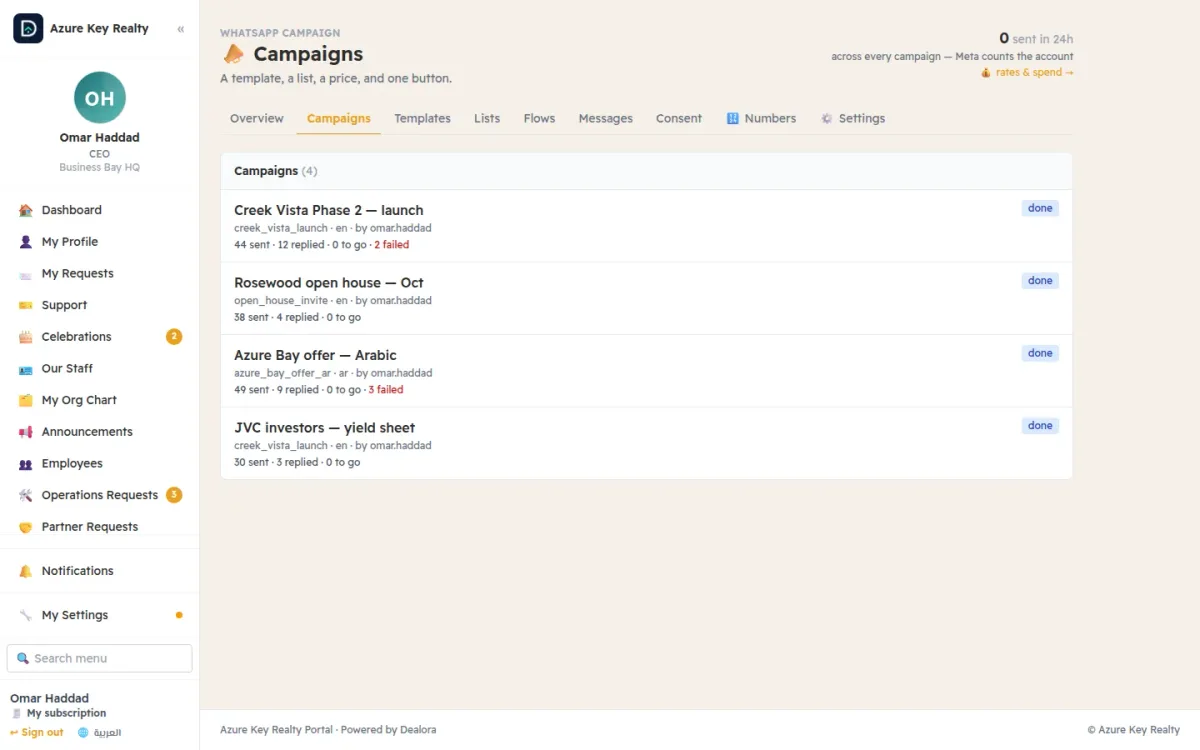
The Dealora Social Inbox puts Messenger, Instagram and WhatsApp conversations on one screen inside the CRM. Salespeople reply to their own clients within the 24-hour window, and when it has closed the button becomes Log sent: the salesperson writes from their own phone and records what was sent on the client. Unknown senders can be linked to a client by name, phone or email, and inbox administrators see every failed send with the reason and the fix.
Social Inbox is on the Growth plan and above, so it is not part of the Starter trial. Before you switch, test three things: that every channel reconnects after a token problem, that a conversation from an unknown sender can be linked cleanly, and that the person who should answer a client really does see the chat.
What stays outside
Calls and face-to-face talk, and any message Meta will not accept outside the window. The inbox records the log of a message sent from a personal phone, but it does not send it. Group chats you use socially with colleagues can stay as they are. What should leave the group is anything the company needs to find later: lead handovers, client questions and approvals.
Hand-built ad reports
Signs it can be replaced
The ad spend sits in Meta, the leads in a sheet and the signed deals with finance, and someone stitches the three together every month. The cost per lead quietly counts walk-ins and referrals as though ads had bought them. A sale that closes four months after the click drops out of the count.
What to check before dropping it
The report is only as good as the link between a sale and the lead behind it, so check the CRM first. If sources are not recorded on clients, the dashboard has nothing honest to count. In the Dealora Marketing Dashboard, only sales that came from a paid ad count toward cost per lead and ROAS, and each sale arrives with suggested leads that a manager confirms or rejects.
Decide up front whether a sale belongs to a period by its deal date or its contract date, and write it on the wall. Tables export to Excel, so finance can keep any workbook it still needs.
What stays outside
Building and optimizing creative inside the ad platform itself. The dashboard measures what the money brought back; it does not replace the judgment of the person running the campaigns.
Posting plans and design feedback in chat groups
Signs it can be replaced
The posting plan is a spreadsheet on one laptop, the designs travel in a WhatsApp group and the sales manager gives feedback as a voice note. By Thursday no one is sure which version of the launch post is final, and when the owner asks what went out last month, someone scrolls through chats to find out.
What to check before dropping it
Take your existing posting plan and see whether it imports. Task Management accepts a CSV or JSON file of up to 5 MB and 5,000 rows, maps your columns to fields, and reads Arabic Windows files correctly. Then confirm that the team can live with its views: a grid, a calendar by posting date, a gallery for reviewing designs, and a file library. Comments with @ mentions replace the voice notes.
What stays outside
The design and video tools themselves. The board holds the files, the comments and the status; the work is still made elsewhere.
Sign-in sheets and leave approvals on WhatsApp
Signs it can be replaced
The receptionist keeps a sheet, managers approve leave in a chat, and at month end HR rebuilds everything by hand. Nobody is sure whether a late arrival was excused or how many leave days someone has left. Ramadan hours and official holidays make the arguments worse.
What to check before dropping it
List your rules on one page before you configure anything: default hours, grace minutes, weekend days per department, Ramadan hours, holidays, leave types and the lateness ladder. Attendance & Leave holds all of these, records check-in and check-out from the phone with an optional branch geofence, and sends leave requests to the direct manager. Leave types carry quotas, units, paid or unpaid, pro-rating, eligibility and carry-over.
If you operate in Egypt, check those settings against the law. Labor Law No. 14 of 2025 was issued on May 3, 2025 and took effect on September 1, 2025, replacing Law No. 12 of 2003. It limits daily work to eight hours and weekly work to 48 hours, excluding meal and rest breaks (Article 117). Each worker must get weekly rest of at least 24 full hours after no more than six consecutive working days, and weekly rest is fully paid (Article 120).
Annual leave is 15 days in the first year, 21 days after, and 30 days after 10 years of service or at age 50, with 45 days for employees with disabilities, excluding public holidays and weekly rest days. Entitlements vary with the employee's situation, so set each leave type with your adviser. The employer must settle the leave balance, or pay for it, at least every three years (Article 125). A worker required to work on an official holiday receives, on top of the wage for that day, twice that wage, or a substitute day off on written request (Article 129).
What stays outside
The legal duty to post a table of the weekly rest day, working hours and rest periods at the main worker entrances, and to notify the administrative authority within seven days of any change (Article 122). That is a physical and administrative step, not a software one. Legal interpretation also stays with your lawyer.
Salary spreadsheets and the advances notebook
Signs it can be replaced
A consultant took an advance in March, a team leader had a bonus approved by voice note, and a branch manager wants a deduction for a missed site visit. None of it lives in one place, the payslip goes out late, and corrections made on last month's sheet change a figure the employee already saw.
What to check before dropping it
Do not start with payroll. Payroll builds each payslip from the salary on file, named allowances, bonuses, insurance shares, advance instalments and the month's attendance, so its inputs must exist first. Its run screen warns you with an amber box when a source is empty, for example no check-ins or a month not closed in Attendance, and a red box lists people with no salary on file, who are skipped rather than paid zero.
Check how your insurance is treated: it is typed by hand as an employee share and a company share, and only the employee share is deducted. Then run one month in parallel with your sheet and compare each line. Every payslip line shows why it exists, and once published a payslip is locked.
What stays outside
Moving the money. Payroll produces and publishes payslips; the transfer from your bank and the books behind it stay with your finance team and your accounting software.
Passwords in notes, chats and browsers
Signs it can be replaced
The Instagram page login lives in a message from two years ago. Former employees still know the email password, and no one can say who last changed a login or who has seen it.
What to check before dropping it
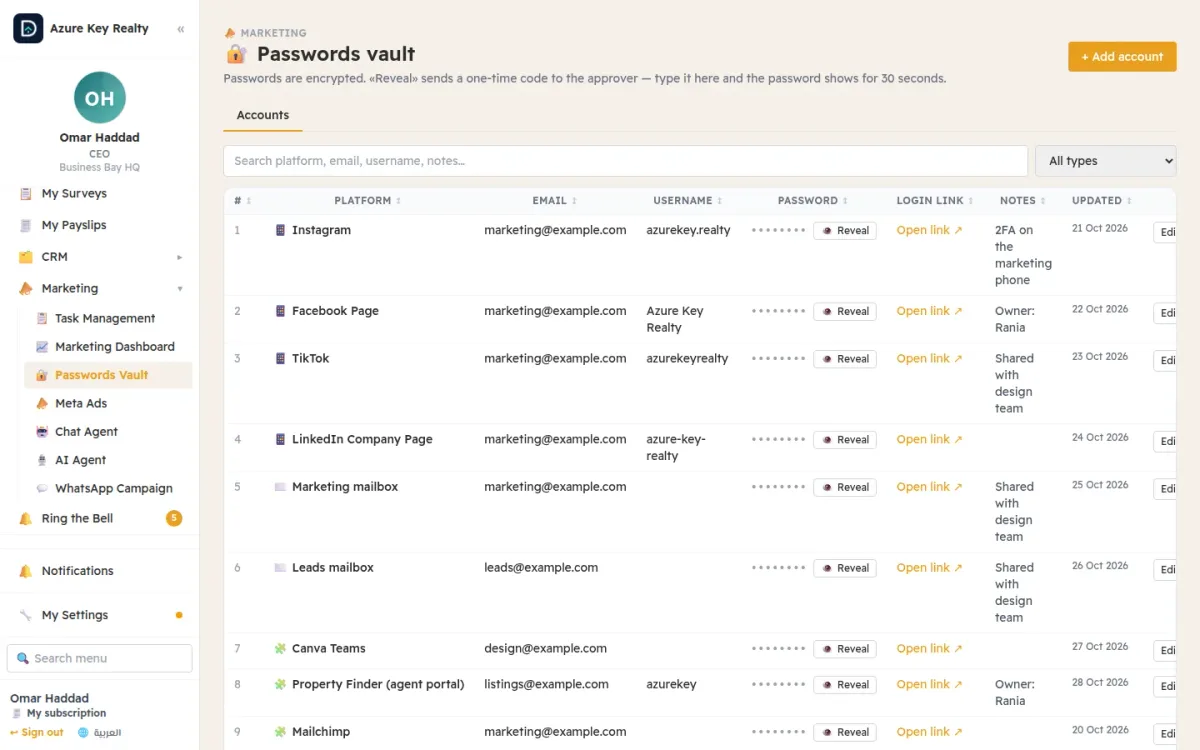
Count the accounts your marketing and operations teams actually share: social media, email and apps. The Passwords Vault stores them encrypted, and a password shows only with a one-time code. Before moving, decide who may reveal which login, and change every password that was ever sent in a chat.
What stays outside
Personal passwords of employees, and any login that a vendor requires to sit in its own system. The vault is for company accounts.
What a single platform will not cover
An all-in-one platform for brokerages removes copying between tools, but it does not remove every other tool. Be honest about the edges before you sign anything.
- Accounting: Dealora has no accounting module. Keep your ledger and your accountant.
- Meta's rules and charges: the 24-hour window, template approval and per-message charges are set by Meta, not by any CRM.
- Creative tools: design, video and ad-building happen in their own software.
- People and habits: a tool does not make a salesperson log a call. Rules such as required actions before a stage change help, but a manager still has to read the reports.
- Anything not on the features page: if a feature is not listed on the features page, assume it is not offered, and ask us before planning around it.
The honest test of a single platform is whether the numbers owners care about come from one place: where each lead went, what each campaign returned and what each person cost. Where that holds, fewer tools is a gain. Where it does not, keep the specialist.
A rollout order for your real estate tech stack
Order matters because some modules read the data of others. The sequence that works for most brokerages:
- CRM. Leads, clients, sources, stages and owners. Everything else points back to this.
- Social Inbox. Connect Messenger, Instagram and WhatsApp once clients exist to link conversations to.
- Marketing Dashboard. It needs sources on clients and deals in the pipeline to link sales to leads.
- Task Management. Import the posting plan and move feedback into comments.
- Attendance & Leave. Configure shifts, holidays, leave types and the lateness ladder, then close one month.
- Passwords Vault. Move shared logins and change the old ones.
- Payroll. Run a parallel month against your sheet, then switch.
Move one team at a time and keep the old tool read-only for a month, so people can look things up without writing to it. Every new Dealora company starts with a free trial of 3 months from the sign-up page. The trial runs on the Starter plan, which covers step 1, the CRM, so you can rehearse the core with real data; steps 2 to 7 need the plans listed under the table above. The full list of Dealora features shows the remaining modules, such as hiring, custody and announcements, for a second audit round once the core is stable.
A sensible next step today: print your tool list, mark each line with its sign, its check and its outside part, and pick the one tool whose failure cost you the most last month. Start there.
Sources
Frequently asked
What is a real estate tech stack?
It is the set of tools a brokerage uses to run its work: lead and deal tracking, client messaging, HR, attendance, payroll, task management, marketing reports and shared logins. Many brokerages build theirs by accident, with spreadsheets, chat groups and separate subscriptions, which is why an audit is useful.
Which tools can a brokerage replace with one platform?
The usual candidates are lead spreadsheets, WhatsApp groups used for distributing leads, separate chat inboxes, sign-in sheets, payroll spreadsheets, task tracking in chats, password notes and hand-built ad reports. Accounting software and the physical posting of work schedules are examples of what stays outside.
Is an all-in-one platform for brokerages always better than separate tools?
Not always. A single platform removes copying between tools and gives owners one set of numbers, but it will not cover everything. If a specialist tool does one job well and its data never needs to meet the rest of your business, keep it and connect it by export.
In what order should a brokerage move off its old tools?
Start with the CRM, because leads and deals are the core records. Then add the social inbox, marketing reporting, tasks, attendance and shared logins. Do payroll last, since it reads the month's attendance, and run one closed attendance month before the first payroll run.
Do I need to keep my accounting software?
Yes, in most cases. Dealora has no accounting module, so the ledger, tax work and bank payments stay with your accountant and your accounting software. Dealora's payroll module produces and publishes payslips, but moving the money stays outside it.
Read next
- How to Scale a Real Estate Brokerage: Systems at 20, 50, 100 Reps A stage-by-stage map of the systems a brokerage needs at about 20, 50 and 100 salespeople: what breaks at each
- Real Estate Software Egypt: A 10-Point Buying Checklist A market-specific checklist for Egyptian brokerage owners: Arabic and English screens, WhatsApp and Instagram
- Real Estate Software Saudi Arabia: A 10-Point Buying Checklist A buying checklist for Saudi brokerage owners: Arabic and English screens, WhatsApp and Instagram leads, Meta
- Software for a 20 Agent Brokerage: What to Require A requirements list for a brokerage of about 20 agents: what the software must do on day one, what can wait, h