
How to Track Leads from Meta Ads to Closed Deals, Step by Step
By Dealora Published Updated Reviewed by Ali Darwish 8 min read
Follow one lead from a Meta ad to a signed deal. See where brokerages can lose it at each step, which Dealora screen handles that step, and why cost per closed deal matters more than cost per lead.

To track leads from Meta ads to closed deals, give every lead one record that carries its campaign source from the lead form to the CRM, assign it to a named salesperson immediately, log every follow-up and meeting against it, and mark the deal on the same record. Then divide ad spend by closed deals, not by leads.
To track leads from Meta ads to closed deals, one lead needs one record that follows it the whole way: from the ad that produced it, through the lead form, into the CRM, to a named salesperson, through every call and meeting, and finally to a deal marked on the same record. Many brokerages do not fail at the ad. They lose the lead somewhere in the handoffs after it. This walk-through follows a single lead and marks the point where it can disappear at each step.
How to track leads from Meta ads to closed deals: the path of one lead
Take a typical case. A person scrolling Instagram sees an ad for a two-bedroom apartment in a new compound, taps it, and fills in a short form with a name and a phone number. From that moment interest fades quickly, and how long the brokerage has varies from lead to lead.
The table shows the whole path, a common leak at each step, and the Dealora screen that covers it.
| Step | Where real estate leads get lost | Dealora screen |
|---|---|---|
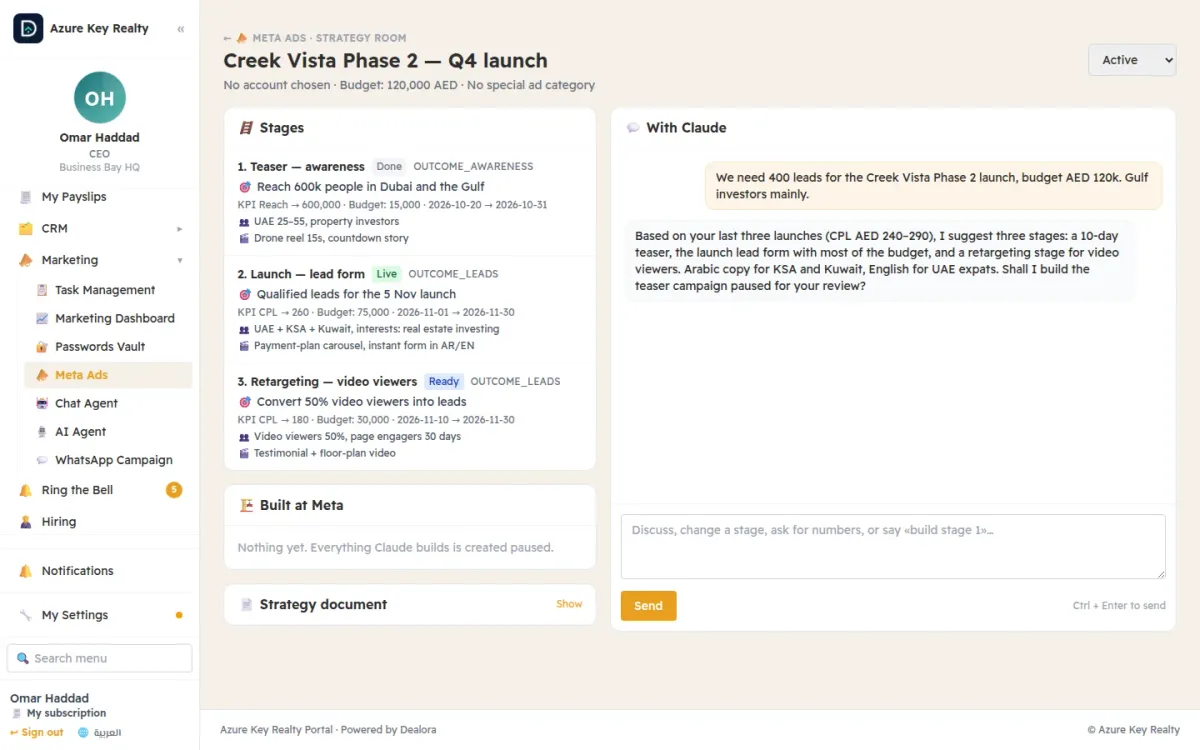
| 1. Ad and lead form | Vague promise, long form, no campaign naming | Meta Ads (live campaigns, strategies built with AI, launch approvals) |
| 2. Arrival in the CRM | Leads sit in Meta, are exported late, or lose their source | CRM |
| 3. Assignment | Nobody owns the lead, or two people call it | CRM |
| 4. Follow-up | Slow first contact, replies stuck in chat apps | CRM and Social Inbox |
| 5. Meeting | Booked but not confirmed, outcome not recorded | CRM |
| 6. Deal | Closed on paper, never linked to the ad | CRM and Marketing Dashboard |
Step 1: The ad and the lead form
Tracking begins before anyone fills in anything. If your campaigns are named "Campaign 1" and "New test", you will never be able to say later which one produced a deal. Name every campaign by project, audience and offer, and keep that naming rule the same for everyone who launches ads.
The form itself is the first filter. Extra fields usually lower the number of leads, but a form that asks nothing fills your team's day with people who were never going to buy. Two or three qualifying questions, such as budget range or the type of unit, may cost some leads but help filter out leads your salespeople would waste calls on.
In Dealora, the Meta Ads screen shows live Meta campaigns, lets you build strategies with AI, and holds launch approvals, so a campaign goes live only after someone responsible has signed it off. That approval step is a small control with a real effect: it is the moment you check that the name, the form and the offer match your tracking rules.
Step 2: From the Facebook lead form to the CRM
This is the first place leads get lost, and it is the least visible. A lead form submission lands in Meta's own tools. If someone has to download a spreadsheet and paste it into another system each morning, the lead waits, and the campaign source can get lost in the paste.
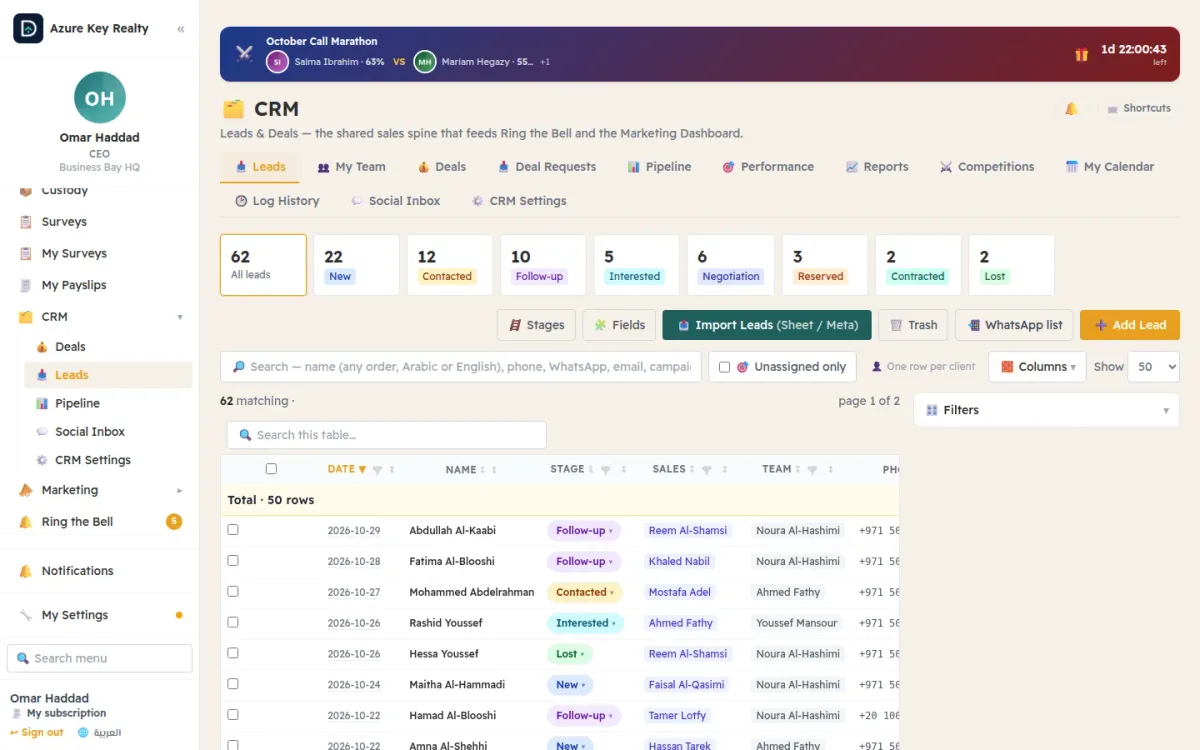
The goal is simple to state: every Meta lead should appear in the CRM lead list on its own record, with its source attached, and nobody should retype it. The CRM covers leads, clients, deals, the pipeline and sources, so the source of a lead sits next to the stage it is in.
Do not trust the setup until you have tested it. Submit a test lead through a live form with your own phone number and check three things:
- How long it takes to appear in the CRM.
- Whether the name, phone number and form answers arrived complete.
- Whether the source shows the right campaign, not just "Meta".
Repeat this test whenever you change a form or launch a new campaign. A form that quietly stopped delivering is one of the most expensive mistakes in paid lead generation, because the ad budget keeps running while no leads arrive.
Step 3: Lead assignment to a salesperson
A lead that belongs to "the team" belongs to nobody. In the CRM lead list every lead shows its date, stage, salesperson and team, and the habit to build is simple: a lead with an empty salesperson column is a problem to fix the same hour, not a lead to look at later.
Decide your assignment rule once and write it down. Common options are rotation among available salespeople, assignment by project or area, or assignment by team. Any of these works. What does not work is a rule that depends on a manager being online to hand out leads by message.
Two checks keep this step honest:
- Each morning, filter for leads with no salesperson and assign them.
- Each week, look at how many leads each salesperson received, so no one is starved or buried.
Step 4: The real estate lead follow-up process
Speed matters a great deal here. A person who filled in a form on a phone expects a response soon, and every hour of delay gives another brokerage the chance to call first. Agree on a first-contact limit, record every attempt on the lead, and set the next action date before closing the record.
A workable follow-up routine looks like this:
- First call or message within your agreed limit, during working hours.
- A second attempt on a different channel if the phone is not answered.
- A short qualifying conversation: budget, timing, area, unit type, and whether the person is buying to live or to invest.
- A dated next step on every lead, even a lead that says "call me next month".
The quiet leak in this step is the chat app. Many Meta leads answer on Facebook, Instagram or WhatsApp rather than picking up the phone. If those replies live on one salesperson's personal device, nobody else can see them, and the history leaves with that person. The Social Inbox brings Facebook, Instagram and WhatsApp messages inside the CRM, so the conversation sits with the lead rather than apart from it.
Step 5: The meeting
A booked meeting is not a held meeting. Leads from ads often agree to a viewing on the first call and then vanish, so confirm the day before and again that morning. Then, and this is the part teams often skip, record what happened: held, postponed, no-show, or lost.
That one update carries a lot of information. If many leads from one campaign agree to meetings but never show up, the problem may be the promise in the ad. If they show up but do not move forward, the problem may be the price, the unit mix or the salesperson. Without the outcome on the record, you can only guess.
Keep the stage of the lead moving as the story moves: new, contacted, meeting booked, meeting held, negotiating. A pipeline that shows these stages with counts tells you in seconds where leads pile up. If many sit in "contacted" and few reach "meeting booked", look at the quality of your calls, not your ads.
Step 6: The deal, and linking it back to the ad
When the buyer signs, mark the deal on the same lead record. Do not open a separate sheet for finance. The whole point of one record is that the deal inherits the source, so that months later you can ask which campaign produced it and get an answer from the system rather than from memory.
Dealora also tracks the celebration side of a signed deal, such as the bell and the review request, in Ring the Bell, which is useful for the team but secondary to this goal. What matters for tracking is that every closed deal carries its original source.
Reading cost per lead against cost per closed deal
Cost per lead is ad spend divided by the number of leads. It is easy to read and it is a standard number in ad reports. The trouble is that it measures the cheapest part of the process. A lead costs money to collect, but a closed deal is what pays for it.
Cost per closed deal from Meta ads is the spend of a campaign divided by the deals closed from its leads. Here is an illustration with made-up round numbers, to show the logic, not a benchmark:
| Campaign A | Campaign B | |
|---|---|---|
| Ad spend | 20,000 | 20,000 |
| Leads | 200 | 100 |
| Cost per lead | 100 | 200 |
| Closed deals | 2 | 4 |
| Cost per closed deal | 10,000 | 5,000 |
On the ad report alone, Campaign A looks twice as efficient. Judged by deals, Campaign B is twice as efficient. The cheaper leads came from a broader audience, and fewer of them could or would buy.
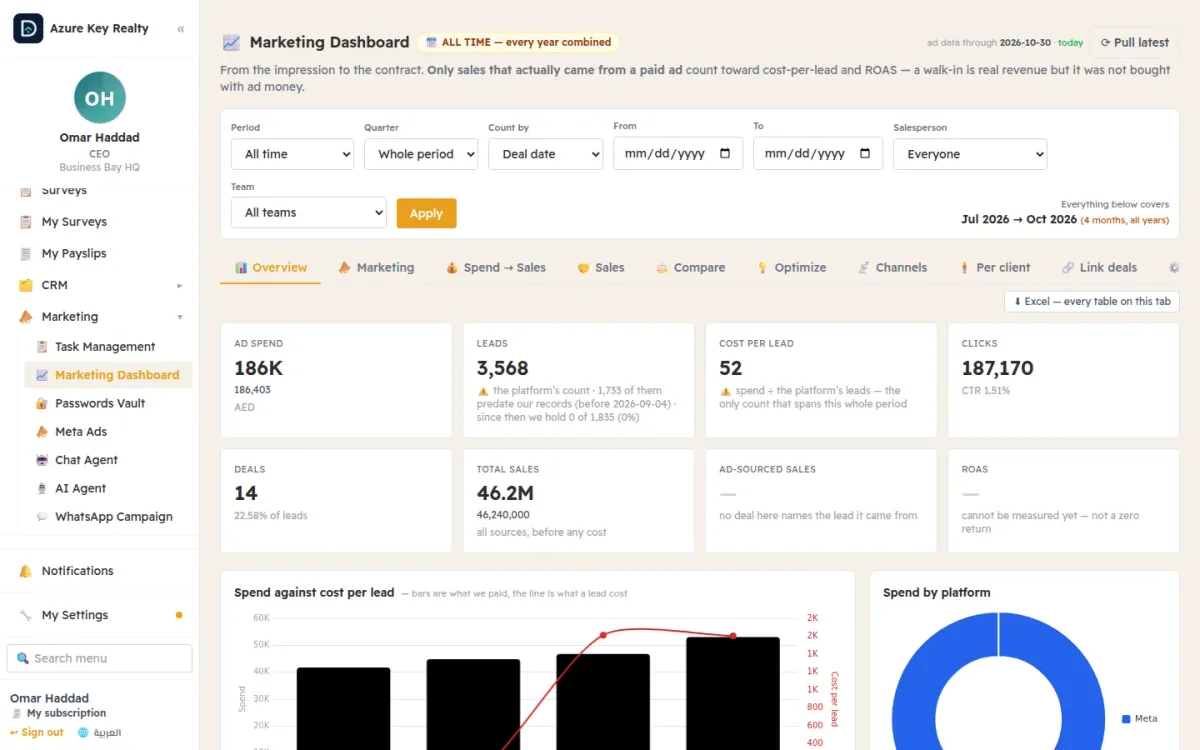
The Marketing Dashboard puts this on one screen: spend, leads, cost per lead, deals and return on ad spend. Read it in this order: first cost per lead to spot a campaign that is getting expensive, then deals per campaign to see what the leads turned into, and last the return on spend.
Two cautions when you read these numbers. First, allow for the sales cycle: a campaign that ran last week has not had time to close deals, so compare campaigns over a period that covers your normal time from lead to signature. Second, do not decide on a handful of deals. Two deals against four is a hint, not a verdict, until the pattern repeats.
A weekly check that keeps the path intact
Tracking only works if someone looks at it on a schedule. A short weekly review, often around thirty minutes depending on lead volume, keeps the tracking honest:
- Count the leads that arrived in the CRM and compare with what Meta reports. A gap can point to a broken handoff.
- List leads with no salesperson or no next action date.
- Check how many leads were contacted within your first-contact limit.
- Review meetings held against meetings booked, per campaign.
- Read cost per lead and cost per closed deal side by side, and move budget toward the campaign with the lower cost per deal.
Before you scale any budget, follow one test lead from its arrival in the CRM to the pipeline and check that its source and stage are recorded. Note on plans: the CRM is on every Dealora plan, including the free trial (Starter); Social Inbox, Marketing Dashboard and Ring the Bell are on the Growth plan and above; Meta Ads is included in Enterprise and available as an add-on from Growth.
Sources
Frequently asked
How do I know which Meta ad produced a closed deal?
Keep the campaign source on the lead record from the moment the form is submitted, and never retype the lead by hand. When the deal is closed on that same record, you can group deals by source and campaign. If the source is lost at the handoff, the link between ad and deal is lost with it.
How fast should a salesperson contact a Meta lead?
As fast as your team can manage, ideally within minutes during working hours. Form leads cool quickly because the person filled the form on a phone while scrolling. Set a clear internal limit, such as a first call or message within a fixed number of minutes, and review leads that break it.
What is a good cost per lead for real estate on Meta?
There is no universal figure, because it depends on the market, the project and the audience. A better test is cost per closed deal. A cost per lead is good only if enough of those leads reach meetings and deals to keep spend per deal below your commission margin.
Why do Meta leads stop replying?
Common reasons are that the first contact came too late, came from the wrong channel, or asked nothing useful. Many leads also reply on Facebook, Instagram or WhatsApp instead of the phone. If those messages sit outside the CRM, the salesperson does not see them and the lead goes cold.
How do I calculate cost per closed deal from Meta ads?
Take the total ad spend of a campaign over a period and divide it by the number of deals closed from leads of that same campaign. Use a period long enough to include your normal sales cycle, because many deals close weeks after the lead arrived.
Read next
- AssetsMena Alternative: A 3-Check Decision Checklist A decision checklist for brokerage owners comparing an AssetsMena alternative: test ad spend to closed deals,
- Real Estate Software Saudi Arabia: A 10-Point Buying Checklist A buying checklist for Saudi brokerage owners: Arabic and English screens, WhatsApp and Instagram leads, Meta
- Software for a 20 Agent Brokerage: What to Require A requirements list for a brokerage of about 20 agents: what the software must do on day one, what can wait, h
- How to Scale a Real Estate Brokerage: Systems at 20, 50, 100 Reps A stage-by-stage map of the systems a brokerage needs at about 20, 50 and 100 salespeople: what breaks at each