
AssetsMena Alternative: A 3-Check Decision Checklist
By Dealora Published Reviewed by Ali Darwish 10 min read
A decision checklist for brokerage owners comparing an AssetsMena alternative: test ad spend to closed deals, developers and projects, and the real cost of moving, using your own last three months of data.

A good AssetsMena alternative passes three tests on your own last three months of data: it ties ad spend to closed deals, it keeps developers and projects beside clients, and the move costs little in lost data and retraining. Run the same test on every platform, then run the finalist beside your current system.
The right AssetsMena alternative is the one that passes three tests on your own data: it ties ad spend to closed deals, it keeps developers and projects in the same place as clients, and the move costs you little in lost history and retraining. This checklist describes no vendor's product. It is a method you can run on any platform, Dealora included, using your last three months of ads and deals. Dealora is a real estate CRM and ERP sold in Egypt, Saudi Arabia and the United Arab Emirates, in Arabic and English, and the sections below show where it passes each check and where a module sits on a higher plan.
When it makes sense to look for an AssetsMena alternative
Most brokerage owners start looking when the same three problems keep coming back. The marketing report and the sales report disagree. A salesperson cannot find a developer's payment plan without asking a colleague. Or the owner cannot say which campaign paid for itself.
Those are data-structure problems, not feature-count problems. A platform with a long feature list can still keep ad spend, leads and contracts in places that never meet. So the comparison below ignores feature lists and asks what happens when you put your own records through each system.
The three checks at a glance
| Check | Test it with | A pass looks like |
|---|---|---|
| 1. Ad spend tied to closed deals | Three months of campaign spend, lead downloads and signed contracts | Cost per lead and return on ad spend per campaign, with the contracts behind each number |
| 2. Developers and projects beside clients | Three developers, their projects, one live deal each | A deal points to a project and a developer from one shared list, with no retyping |
| 3. Cost of moving | An export of your current clients, notes and files, plus two salespeople | Clients arrive merged, history is readable, and a salesperson logs a call on day one |
Check 1: does the system tie ad spend to closed deals?
A lead count is easy to show. The harder number is how many of those leads became a signed contract, and what the ads cost per contract. A system that stops at cost per lead gives you half of the answer.
Build your test file from the last three months
Three months is the right window for a practical reason: leads from Meta instant forms are only available on Meta for 90 days, so older leads cannot be downloaded. Meta recommends downloading leads regularly, and a lead export from before the switch is the cheapest insurance you can buy.
You can pull the file three ways: the On-Facebook leads link in the Results column of Meta Ads Manager, the Instant forms page in Meta Business Suite, or the Leads Center in Business Suite. Each gives a CSV. If a download fails, someone with full control of the business portfolio may have customized the leads access permissions in Business Suite.
Then collect two more things: spend per campaign for the same period, and the list of contracts signed, with the buyer's phone number and the contract date. For the full method of matching them, see the step-by-step guide to tracking leads from Meta Ads to closed deals.
What to ask each platform to show
- Cost per lead and return on ad spend for each campaign, using only sales that came from paid ads. A walk-in or a referral is real revenue, but ad money did not buy it.
- The contracts behind each figure, so you can open a row and see which buyer and which lead it came from.
- A sale that closed months after the click, counted against the campaign that started it.
- A choice of which date puts a sale in a period, the deal date or the contract date, with the exact dates printed on screen.
- A way to set a test campaign aside without deleting its spend.
- The same answer twice: run the same filter on two days and confirm the numbers match.
Ask one more thing about Meta's own numbers. Since 12 January 2026, Meta's Ads Insights API no longer returns 7-day view and 28-day view results, and what Meta counts as a conversion depends on the attribution setting each ad set uses. Meta's conversion count therefore answers a different question from your contract list. Ask any vendor which windows its Meta figures use, and where a contract enters the picture.
How Dealora covers check one
The Dealora Marketing Dashboard follows money from ad spend to leads to signed sales. It counts only sales that came from a paid ad toward cost per lead and ROAS, and it breaks results down by campaign, project and developer. You choose a month, quarter, year or your own dates, decide whether a sale belongs to the period by deal date or contract date, and a line under the filters states the exact dates on screen.
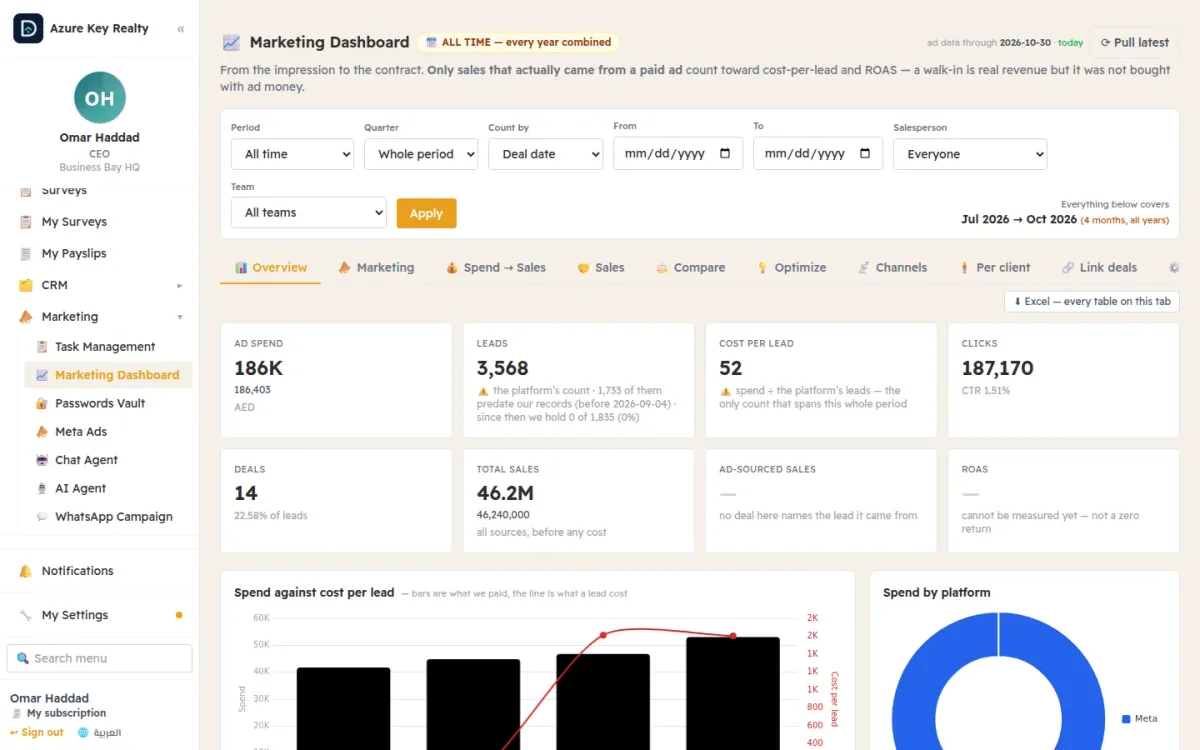
The Spend to Sales tab shows what the money spent in a period brought back, including sales that closed months later. In Link deals, each sale arrives with suggested leads; the manager confirms the buyer, rejects a wrong candidate, or records that the sale came from no lead the company holds, and every decision can be undone. Every table exports to Excel. The Marketing Dashboard is on the Growth plan and above.
If you also want campaigns built and approved in the same portal, Meta Ads is included in Enterprise and is an add-on from Growth, charged as a monthly subscription. It works only with the company's own Meta connection: its Facebook page, Instagram account and WhatsApp Business number. AI builds campaigns that start paused, and nothing spends until a person with the Launch permission approves it. Admins can set optional daily and lifetime caps per ad account.
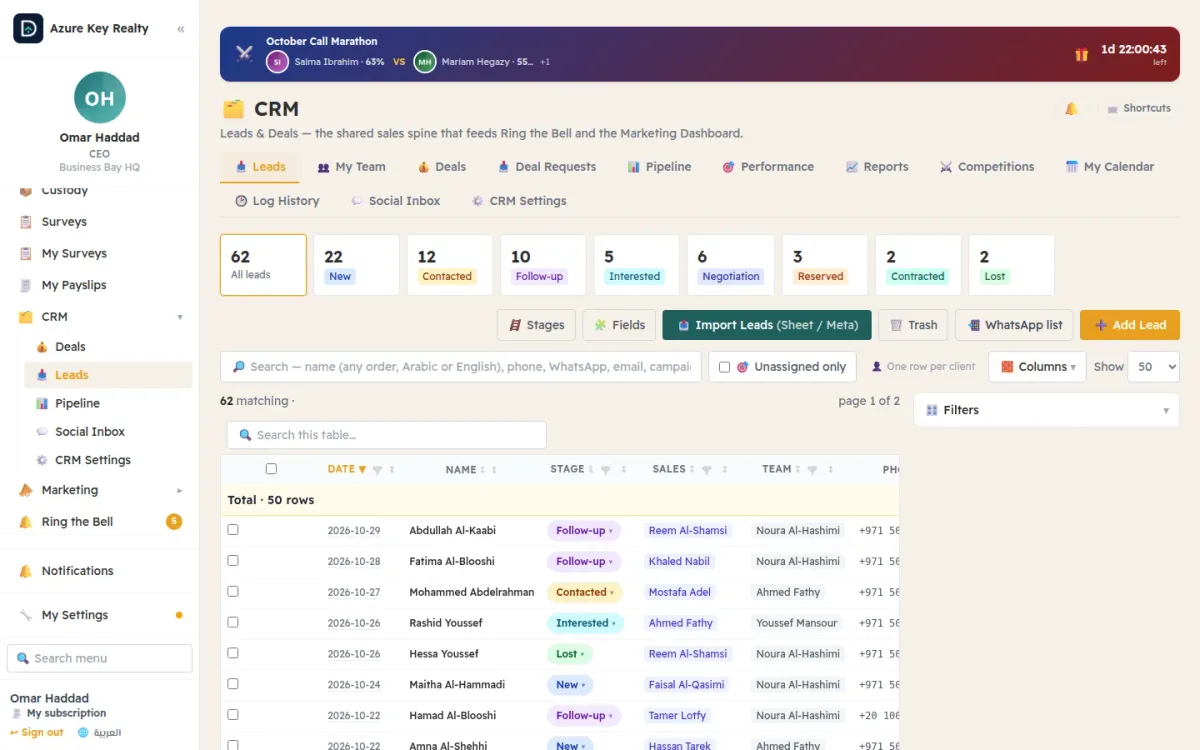
Underneath both sits the Dealora CRM, which records the source of each client, matches phone numbers and emails so one buyer who registered three times becomes one client, and carries requirements such as unit type, budget and project, mostly filled from ad form answers. The CRM is on every plan. To turn the result into a single figure, the formula is in the article on cost per closed deal in real estate.
Check 2: does it keep developers and projects with the clients?
A brokerage sells other people's inventory. If the developer, the project and the phase live in a separate sheet, every deal report depends on someone spelling a project name the same way twice. This is the second test for any real estate CRM for developers and projects.
Run it with three developers who have different numbers of projects. For each, check:
- Can a salesperson open a project and find the master plan, brochure, payment plan and floor plans without asking anyone?
- Does a deal for one unit point to a project and developer picked from a shared list, or typed as free text?
- Where does the signed commission agreement live, and when a new agreement replaces the old one, is the old one kept for deals priced under it?
- Can the client's requirement, such as a project name, be clicked to show everyone else who wants the same thing?
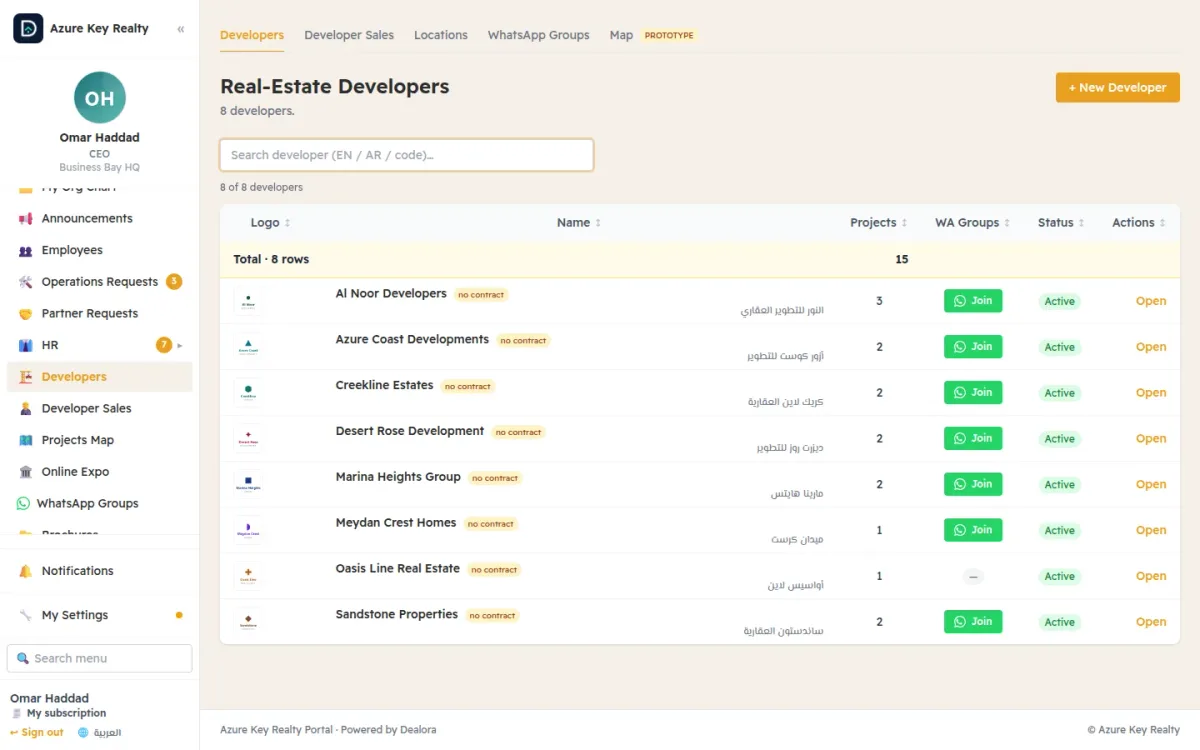
In Dealora, Developers & Projects is one source that deals and the projects map read from. Each project holds its type, location, phases and files (PDF or pictures up to 60 MB each). Locations are your own two-level list of regions and areas, so every report spells a place the same way. People with the contracts permission file each contract with its signed date, commission percentage and files; a new agreement becomes a new version and the old one stays. A rate library lists the commission rates a developer pays, developer-wide, per project or per phase. Developers & Projects is on every plan, including the free trial.
Check 3: what does the move cost in data and retraining?
Switching a CRM is rarely blocked by the new system's price. It is blocked by what you lose on the way: a client's call history, the notes on a viewing, the files attached to a deal. Put numbers on that before you decide.
Data: ask for the exit before you enter
Ask your current vendor for a full export of clients, activity history, deals and files, in what format, and at what cost. Do this first, because it is the one request that gets harder after you give notice. Ask the same of the new vendor: in Dealora, data export is included from Growth, Business and Enterprise, and it is not part of Starter or Individual. Read the plan table on the pricing page with that in mind.
Clean the file before you load it. Merge duplicate phone numbers, add a source to every client, and load developers, projects and locations before open deals, so each deal can point to a project from the list. Dealora's CRM also matches phone and email on arrival, so a duplicate row merges into one client with several requests behind it.
Client data and consent when you move
A client list is personal data, and moving it is a handling event. Each market Dealora serves has its own law:
- Egypt: Personal Data Protection Law No. 151 of 2020 governs client data, and its Executive Regulations apply to every company that holds it. Read both with your legal adviser before you move a client list, and before you store it outside Egypt.
- United Arab Emirates: Federal Decree-Law No. 45 of 2021 came into force on 2 January 2022. Under its Article 5, data must be collected for a specific, clear purpose and not processed later in an incompatible way. Under Article 6, the controller must be able to prove consent when processing relies on it.
- Saudi Arabia: the Personal Data Protection Law is in force, and SDAIA is its regulator.
In practice, bring each client's source and consent record across with the client, and ask any vendor where your data is hosted. Confirm the details for your company with your own legal adviser.
Retraining: measure it, do not guess it
Train by role, not by screen. Salespeople need the client page, their own leads and logging activity. Team leaders need to see what each person holds. The CRM admin sets stages, sources and pools, and approves deals. A fair measure is simple: on day one, can each trial salesperson log a call and move a client without help? If two of three cannot, the retraining cost is higher than the price difference you were chasing. For a wider scoring sheet beyond these three checks, the real estate CRM comparison from Keys of Success adds more points.
Run both systems side by side during the 90-day trial
Every new Dealora company gets a 90-day free trial on the Starter plan. The trial holds Employees, CRM, Developers & Projects, Projects Map and the Developer Sales index. It has no data export, so treat your current system as the primary copy until you decide. Modules beyond those five are judged from their feature pages and a talk with the Dealora team about the right plan.
- Days 1-14, load and train. Create the account, load developers, projects and locations, then import a cleaned copy of your clients and open deals. Pick two or three salespeople and one team leader, and train them by role.
- Days 15-60, run in parallel. New leads reach both systems. The pilot group works in Dealora, everyone else stays put. Each week, compare the client count, the unassigned leads and the time to first logged action, and note every record that arrived wrong.
- Days 61-90, decide with your test file. Re-run the three checks from the table above on the same three months. If you need the ad-to-deal view, discuss the plan with the team first. Move the rest of the sales team only when the pilot group has worked a full month without falling back to the old system.
When the numbers hold, cancel the old system after its export is safely stored. To begin, create a free Dealora account and load your first developer and ten clients today; that single hour shows you more than a vendor page can.
Sources
Frequently asked
What should I look for in an AssetsMena alternative?
Look for three things you can test with your own data: whether ad spend is tied to closed deals and not only to leads, whether developers and projects sit in the same system as clients, and what the move costs in exported data, import work and retraining. A vendor that cannot run your last three months of data has not passed the first test.
How do I test whether a CRM ties ad spend to closed deals?
Take your last three months of campaign spend, your lead downloads from Meta and your signed contracts. Ask the platform to show cost per lead and return on ad spend for each campaign, with the contracts behind each figure. Check that walk-ins and referrals are excluded and that sales closed months after the click are counted.
How long can I download Meta lead ad leads?
Leads submitted through Meta instant forms are available on Meta for 90 days, so older leads cannot be downloaded. Download them regularly, as a CSV from Ads Manager, the Instant forms page in Business Suite, or the Leads Center. This is also why a three-month test window is the one you can still rebuild today.
Can I run Dealora next to my current CRM before switching?
Yes. Every new company gets a 90-day free trial on the Starter plan, which holds Employees, CRM, Developers & Projects, Projects Map and the Developer Sales index. Load a copy of your clients, developers and projects, give a few salespeople both systems, and compare. Keep your current system as the primary copy meanwhile, since the trial has no data export.
Which Dealora plan includes ad tracking?
The Marketing Dashboard, which follows spend to leads to sales, is included in Growth, Business and Enterprise. Meta Ads is included in Enterprise and is an add-on from Growth, and it needs the company's own Meta connection. The CRM with lead sources is on every plan, including the free trial.
Read next
- Real Estate Sales Dashboard: 3 Views Every Manager Needs One screen, three views: agent, team and project or developer. Which number goes where, who reads it, and whic
- Cost per Closed Deal Real Estate: Formula and Example A step-by-step formula that carries ad spend through cost per lead, qualified lead and viewing to one number p
- How to Test a CRM Free Trial: A 30-Day Plan for Brokerages A week-by-week 30-day plan for brokerage owners: import real leads, run the pipeline with real reps, check dev
- How to Scale a Real Estate Brokerage: Systems at 20, 50, 100 Reps A stage-by-stage map of the systems a brokerage needs at about 20, 50 and 100 salespeople: what breaks at each